
 Good work.


Your website is live. Lovely. Now, six months later, you want to add a service, answer a question customers keep asking, or give people a better reason to contact you.
Can you do it? Who has to help? And does a small change turn into a surprisingly large project?
That’s where I start when choosing a website platform. The launch matters, of course. I also care about what you can do with the website once the confetti has been swept up.
I build Authority One websites on WordPress because it gives me room to shape the site around your business—and room to improve it as your business changes. There’s a tradeoff: somebody has to look after it. I’ll explain both sides so you can decide whether that suits you.
I used to work with million-dollar marketers. Now I work with small-business owners. The budgets may be different, but I still want a website to answer the same useful questions: what’s the offer, why should someone trust it, and what should they do next?
WordPress gives me tools to build that path. The judgment about what belongs on the page still comes from understanding your business.
First, which WordPress am I talking about?
WordPress is software for building a website and managing its content. You can add pages, publish articles, upload images, and make changes without writing every page from scratch.
For my builds, I use self-hosted WordPress. That means the site runs with a hosting company selected for the project. Hosting is the service that keeps your website available online. You don’t need a server humming away under your desk.
You’ll also see WordPress.com. It uses WordPress too, but offers it with hosting bundled into its service. That distinction trips people up because the names are almost identical. WordPress.com’s own comparison explains the difference.
Then there’s the design tool. I use Elementor to help shape the layout inside WordPress. WordPress manages the site; Elementor helps me build the pages visually. In my review, I explain why I use it and what the learning curve looks like.
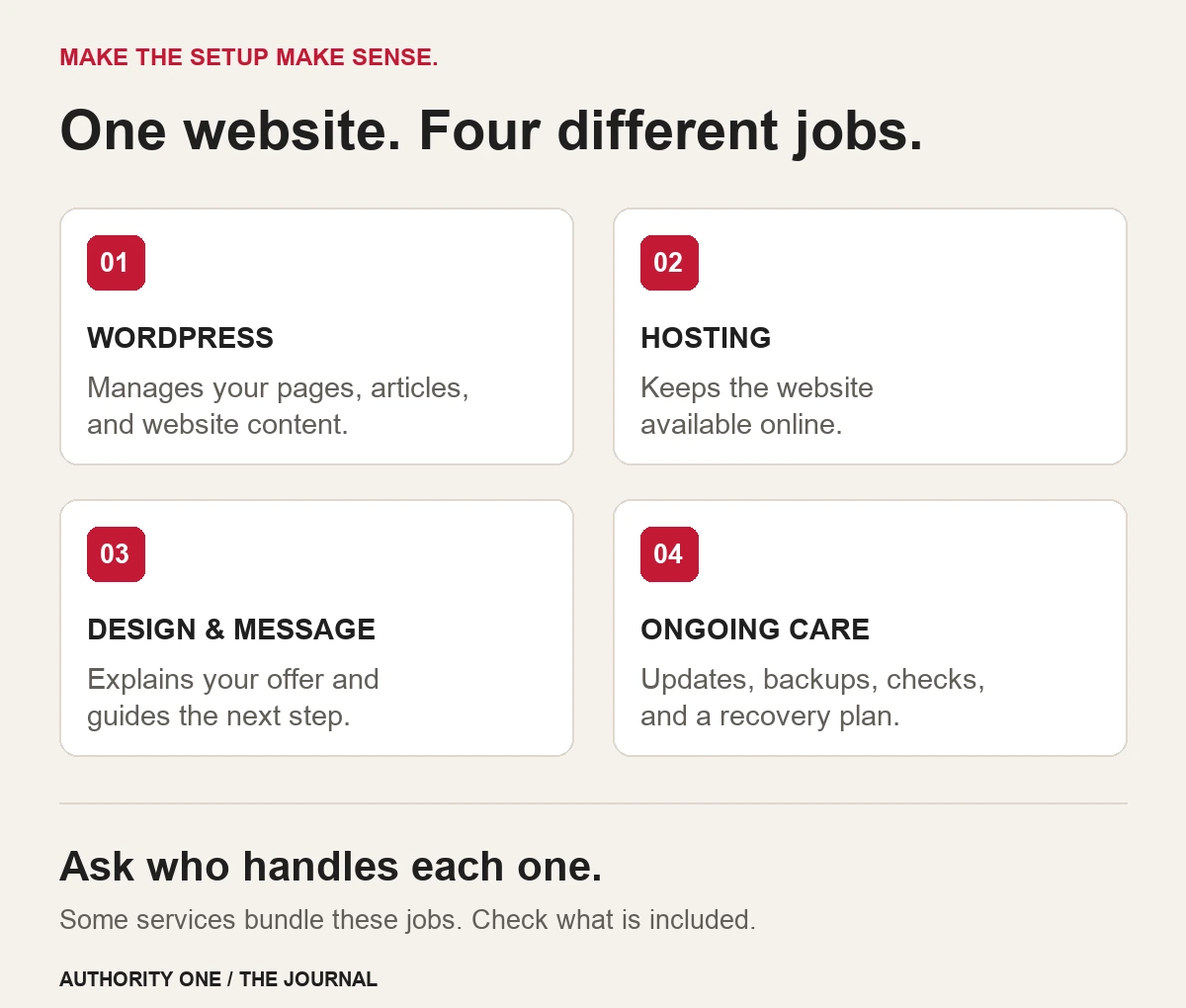
You don’t have to remember all the product names. The useful question is: what am I getting, who manages it, and what can I change later?
The benefits I care about for a small business
You have options about who looks after the site
WordPress is open-source software. You can use and adapt it, and a self-hosted site can be moved to another suitable host. You can also hire a different WordPress professional to work on it.
That flexibility matters. Maybe your business outgrows its hosting. Maybe you need a specialist for a new feature. You should be able to discuss those options without the website becoming a hostage situation.
There’s a practical detail behind “you own your website,” though: you need the right access and a clear handover. Ask who controls the domain, who has the hosting account, how you get a full backup, and which paid tools the site depends on.
A theme, page builder, photo, or paid service may have its own license or subscription. Those don’t disappear because the site runs on WordPress. And moving a WordPress site to a completely different platform may require rebuilding the design.
WordPress’s migration documentation describes the work involved in changing hosts or addresses. My takeaway for an owner: you have useful options, but budget for a proper move when you need one.
The page can follow the way your customers decide
Imagine a dog groomer who wants more first-time appointments. A customer may be wondering about nervous dogs, coat types, how long an appointment takes, and what to bring.
I’d want room for a clear service introduction, real photos, useful answers, and an obvious way to request an appointment. That’s a different page from one for an accountant whose visitor needs to understand the firm’s specialties and feel comfortable booking an initial conversation.
With WordPress and the right design tools, I can arrange that information around the customer’s questions. We can change the wording, move helpful proof nearer the inquiry button, or simplify a form later.
Other platforms can do some of this too. The reason I choose WordPress is that its flexibility fits the work I want to do for you.
If you want to see the thinking behind those choices, start with the five questions your homepage needs to answer. You can try that check on whatever platform you use today.
You can build a useful body of content
Here’s a made-up example. A bookkeeper starts with a homepage explaining monthly bookkeeping. Over time, people keep asking whether they work with contractors, what records they need, and how catch-up bookkeeping works.
Those questions could become a focused service page, a preparation checklist, and an article. Each earns its place by answering something a customer actually needs to know.
WordPress has built-in tools for pages, posts, media, drafts, and revisions. Its features overview explains the basics. I like being able to prepare content, review it, and organize it so people can find related help.
You don’t need to publish every passing thought. A clear answer to a real customer question is a better starting point than another article called “Our Commitment to Excellence.” I suspect the internet has enough of those to last us a while.
You can add a new job for the website when it makes sense
Plugins add functions to WordPress. Depending on the tools chosen, that might be a request form, a booking connection, a resource library, or email follow-up. Some are free; others need paid plans or outside services.
My own Business Growth Library is a real example. The WordPress page explains what’s inside. A signup form collects the details needed for access, and the email setup handles confirmation and the welcome message.
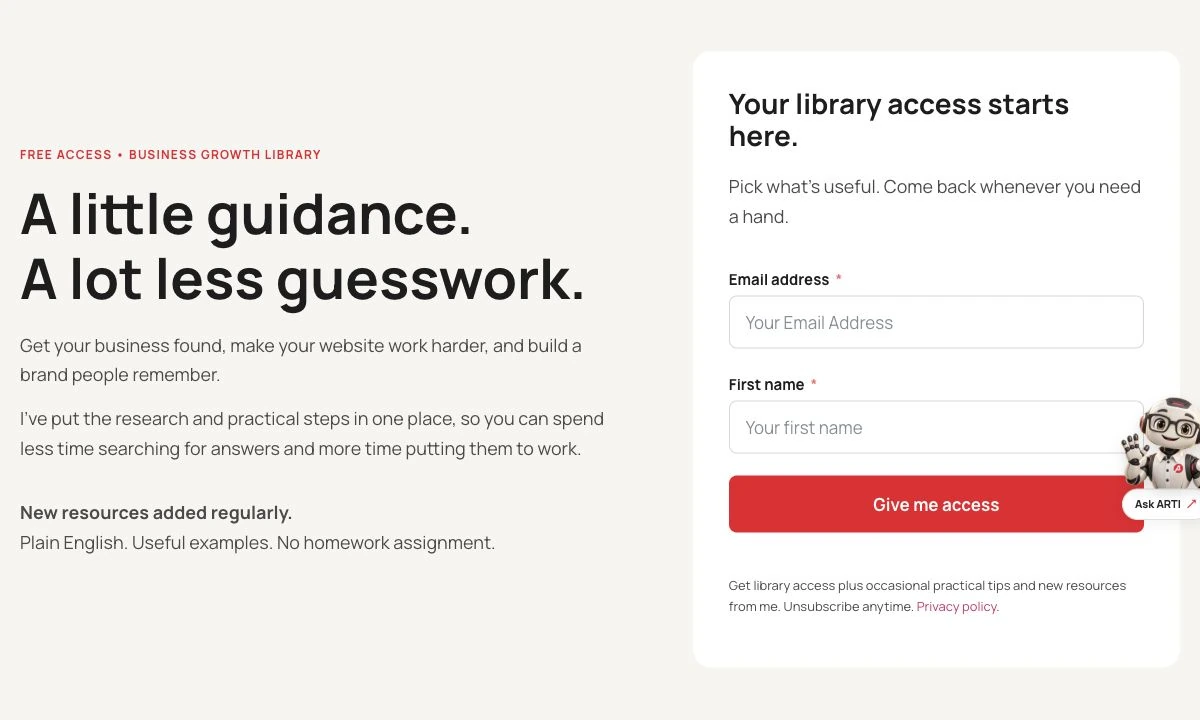
If a visitor isn’t ready to request a website, the library gives them something helpful to use. It also gives me a way to keep the conversation going with people who choose to hear from me.
I explain the email tool in my FluentCRM review. The important part is choosing a useful next step before buying software to automate it.
For your business, that next step could be a preparation guide, a consultation request, or a link to an existing scheduling system. We should choose what helps the customer and your team. Adding features because we can is how a tidy website becomes a digital junk drawer.
Routine changes don’t all have to become design projects
You might want to update an opening hour, replace a photo, or publish a new article. A well-planned WordPress setup can give you a manageable way to do that.
The words “well-planned” are doing some work there. Editing a short text field is easier than rearranging a complex page. I’d rather show you the few changes you need to make than drop you into a dashboard and wish you luck.
WordPress also has different user roles. Someone who updates articles doesn’t automatically need permission to change every setting on the site. Give people access that fits their job.
The drawbacks I’d want you to know about
If someone describes WordPress as free, effortless, and completely maintenance-free, ask them to stay for the next part of the conversation.
Somebody needs to look after it
WordPress, themes, and plugins need updates. The site needs backups and a way to recover if something goes wrong. Hosting, account access, and form delivery need attention too.
WordPress’s security guidance emphasizes current software, maintained plugins and themes, monitoring, and planning for recovery. Its update guide recommends backing up before an update.
That doesn’t mean you personally have to spend Tuesday evenings babysitting plugins. It means somebody’s name should be beside the job: yours, your host’s, or the person providing website care. Make sure the responsibilities are clear.
“Managed hosting” and “website care” can cover different things. Ask what happens if an update breaks a form, how you request a change, and who can restore the site. If you want to see how I approach it, my Care & Growth overview is here.
The plugin cupboard can get out of hand
A plugin for one useful job can be sensible. Three plugins trying to do the same job can create confusion, extra loading, or compatibility problems.
I want to know why each tool is there, whether it’s actively maintained, and what happens if we stop using it. A booking service that makes the owner’s day easier has a reason to stay. A decorative effect nobody notices has a harder case to make.
There’s no magic plugin count that makes every website good or bad. The jobs those plugins do, their quality, and how they work together matter.
There is a learning curve—and the build can be messy
WordPress gives you choices. That’s helpful until you’re staring at menus for a theme, a builder, forms, backups, and SEO, wondering which one changes the phone number.
A beginner can learn it. You don’t need to learn everything at once. Start with the tasks you’ll actually use, and ask for a short walkthrough on your own site.
Flexibility also means build quality varies. Slow hosting, oversized images, heavy effects, and a poorly arranged mobile page can make a WordPress site frustrating to use. Installing WordPress doesn’t settle those design decisions.
And if your layout uses a page builder, changing builders later can take work. Being able to move the site between hosts doesn’t mean its design becomes independent of every tool used to build it.
Free software still comes with real costs
The WordPress software can be downloaded without a license fee. Your finished business website still needs a domain, hosting, a build, and ongoing attention. Paid plugins or outside services may add recurring costs.
Compare the whole arrangement. A low starting price tells you very little if you don’t know the renewal price, what support covers, or which tools stop receiving updates when a license expires.
| Cost | Question to ask |
|---|---|
| Initial build | Which pages, copy, images, forms, and revisions are included? |
| Domain & hosting | Who controls the accounts, and what do renewals cost? |
| Paid tools | Which licenses or outside subscriptions does the site need? |
| Ongoing care | Who handles updates, backups, recovery, and checks? |
| Future changes | What’s included, and how are extra pages or new features quoted? |
A useful comparison is the build cost plus a year of running and caring for the site. Keep optional growth work separate so you know what you need now and what can wait.
Is WordPress good for SEO?
It gives us a useful foundation for SEO: helping search engines find and understand the website. With the right setup, we can manage page titles, descriptions, links, and useful content. SEO tools can help with that work.
What they can’t do is make an empty promise convincing or turn a vague service page into a useful answer.
Picture a plumber offering water-heater replacement. A page could explain what the service involves, the real area served, what information helps with an estimate, and the next step. That’s worth planning because it helps a person decide whether to contact the business.
Google’s Search Essentials recommends helpful content, descriptive wording in titles and headings, and links search engines can follow. It also says meeting the requirements doesn’t guarantee a page will be crawled, indexed, or shown.
So I wouldn’t promise you a ranking just because we chose WordPress. Google’s page-experience guidance also points to mobile usability, secure pages, performance, and content people can reach without interruptions.
My recommendation is to use the flexibility to do that work well. Write useful pages about services you genuinely provide, show real proof, and make the site easy to use. Repeating a town name in fifty nearly identical pages is a poor substitute for giving someone a helpful answer.
When I’d choose WordPress—and when I’d pause
For the service businesses I build for, WordPress is usually a strong fit. Here’s how I’d think through the decision with you.
| Your situation | My advice |
|---|---|
| You want a distinctive service website with useful articles and room to add functions. | WordPress is worth serious consideration. Agree on the upkeep from the start. |
| You need a simple presence and prefer one provider to bundle the main tools and support. | A hosted builder may suit you. Check editing, support, renewal costs, and your options if you want to move. |
| Your business depends on a specialist booking, inventory, or client system. | Start with that workflow. Confirm the website can connect to it before picking the design tool. |
| Your current site is clear, reliable, and easy to improve. | Keep it unless there’s a worthwhile reason to change. A platform switch isn’t a business goal by itself. |
If you bring me an existing site, I want to hear what’s getting in your way. “Customers can’t find the service they need” is useful. “Someone told me WordPress is better” needs a little more conversation.
Seven questions to ask before someone builds your website
These will tell you more than a long list of technical features. You can use them with me or with anyone else you’re considering.
- What do we want visitors to do? Call, ask for an estimate, request a consultation, or something else?
- What do they need to understand before doing that? Plan the message and proof around those questions.
- What exactly is included in the build? Get the pages, content responsibilities, features, and review process clear.
- What can I edit myself? Ask to see the routine changes on a real example.
- Who controls the domain and website access? Know how you’ll get a full handover and backup.
- Who looks after it after launch? Ask what updates, recovery, and support actually include.
- What happens when I need something new? Understand the cost and process for adding pages or functions.
If the answers are foggy, keep asking. Choosing the software is only part of choosing the arrangement you’ll live with.
A few questions you might still have
Is WordPress only for blogs?
No. It manages website pages as well as articles, and plugins can extend what it does. A service website can explain the business, show its work, and collect inquiries without having a blog at all.
Can I edit my WordPress website myself?
Yes, with suitable access and a setup you understand. Ask for a walkthrough of the changes you’ll make most often. Publishing an article or changing hours is a different task from rebuilding a complex layout.
Do I need Elementor to use WordPress?
No. WordPress has its own editor, and there are other design approaches. Elementor is the tool I use for my page layouts. Choose the editing approach along with the person who will build and maintain your site.
Can I move the website if I change hosts?
A self-hosted WordPress site can be migrated to another compatible host. Plan the move and check forms, images, links, and email connections afterward. WordPress’s content export is useful, but it isn’t the same as a full backup of the working site.
Is WordPress secure?
Security depends on the setup and ongoing care, including hosting, maintained software, account access, and recovery planning. No platform makes risk disappear. I’d ask who handles those jobs rather than settle for a blanket “yes.”
Should I rebuild a working website just to get WordPress?
Usually, I’d first look for improvements you can make where you are. Consider a move if the existing setup blocks something important, is difficult to maintain, or makes a planned change impractical. Include migration and any URL changes in the plan.
Why it remains my choice
I choose WordPress because it gives me room to build a website around the business and the person trying to become a customer. I can work on the message, the design, the proof, and the next step—and keep improving them.
That’s how I want to use my marketing experience for you. A bookkeeper, a groomer, or a local contractor deserves the same care in explaining an offer that a larger marketing business gets.
The website still needs looking after. Agree on that from the beginning, and WordPress can be a sensible home for a small business with plans beyond launch day.
If you’re still sorting out the message your website needs to deliver, my free Business Growth Library has practical help with websites, visibility, and branding. Pick what helps today. New resources are added regularly.
