
 Good work.


We use FluentCRM here at Authority One Design. We love it, and it does a great job for us. If your business runs on WordPress and you need a better way to stay in touch with people, this is one of my strongest recommendations.
What I like most is the control. Our contacts, signup forms, and email follow-up can work together inside our own website. I can shape the system around our business instead of fitting everything into a separate service.
And there is a big money advantage: FluentCRM does not increase its plugin price when you add more subscribers. Building your email list should feel like progress. With many popular platforms, it also moves you toward a higher bill.
The free version gives you a useful place to start. Pro adds more powerful follow-up tools at a flat annual license price. For a business that already has a WordPress site, I think the value is excellent.
Our recommendation comes from using FluentCRM at AOD. Screenshots are credited vendor examples, so our contacts stay private. The alternative-platform comparison uses official plan information, not a claim that we personally tested every competitor. Checked October 5, 2026.
Why email follow-up deserves a place in your business
Someone visits your site, likes what they see, and downloads a guide. They may need your service next month rather than today. Without follow-up, that conversation can end before it really begins.
A useful email system helps you keep the conversation going. Welcome someone. Deliver what you promised. Share a helpful tip. Explain how you solve their problem. Give them an easy next step when they are ready.
For a bookkeeper, that might mean sharing a tax-season checklist and later explaining how to keep records organized. For a designer, it could mean helping a business owner plan a website before asking them to book a call.
You do not need a giant audience to make this worthwhile. You need relevant messages and a consistent way to send them. That is the job FluentCRM helps you do.
A simple WordPress plugin, with room to grow
FluentCRM installs as a WordPress plugin. You do not need to build an email platform from scratch. Its workspace sits inside the website dashboard, where you can manage contacts and plan messages.
The free plugin listing confirms unlimited contacts and campaigns, plus as many lists and tags as you want. That means you can organize your audience and keep building it without hitting a subscriber limit in the plugin.
For someone who currently has no email follow-up, that is a very generous starting point. Start with a signup form and a useful welcome message. You can add more as your business and confidence grow.
Installing the plugin is straightforward. Planning your follow-up takes some thought, just as it does with any email tool. I see that as learning a valuable business skill, not a reason to put it off.
Contacts and tags: send people something they care about
A tag is simply a label. Someone might be interested in website design, ongoing website care, or a particular guide. Labels help you remember those interests so you can send relevant information.
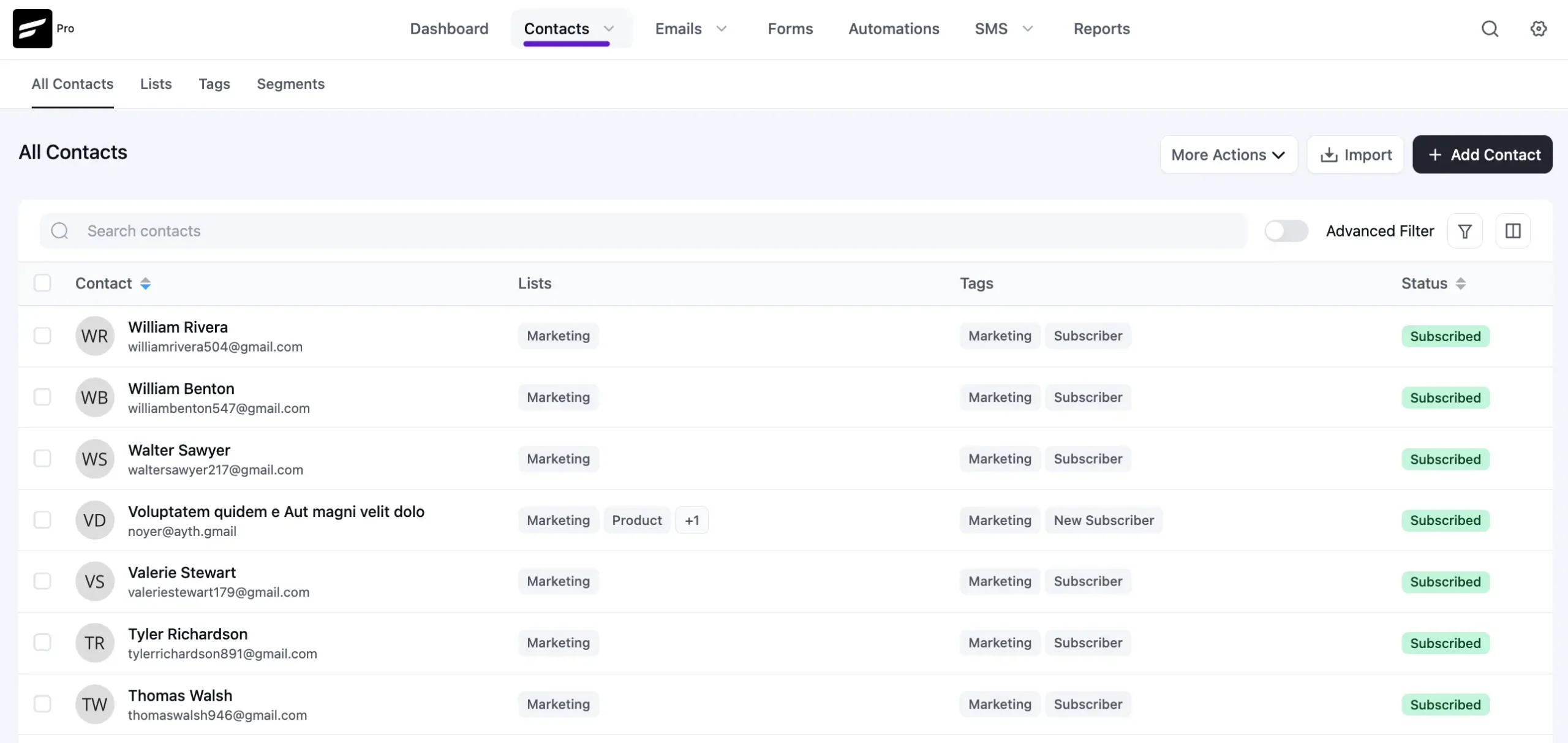
The dashboard puts contacts, filters, and subscription status together. Instead of treating every address the same, you can choose who should receive each message.
Imagine sending a website planning tip to people who requested your planning guide, while existing clients receive a note about keeping their sites current. That feels more helpful than sending everything to everyone.
You will encounter this same idea in other email platforms, even if they call it a group or segment. Learn a few simple labels first. You do not need a complicated system to get real use from it.
Campaigns: stay visible without rewriting every email
A campaign is a message you send to a chosen audience. It could be a newsletter, a useful article, a seasonal offer, or an announcement about a new service.
I like being able to plan these messages alongside the website they point to. A helpful blog post should not depend on people remembering to check your site. Email gives you a way to share it with subscribers who asked to hear from you.
You can keep the writing personal and simple. A short note from the business owner can be more useful than a heavily designed newsletter with six competing offers. Ask yourself: what would help this person today?
Sequences and automation: keep the next step moving
A sequence is a series of emails sent over time. It is useful when every new subscriber should receive the same thoughtful introduction, without you having to remember each message yourself. FluentCRM’s dedicated email sequence feature is part of Pro.
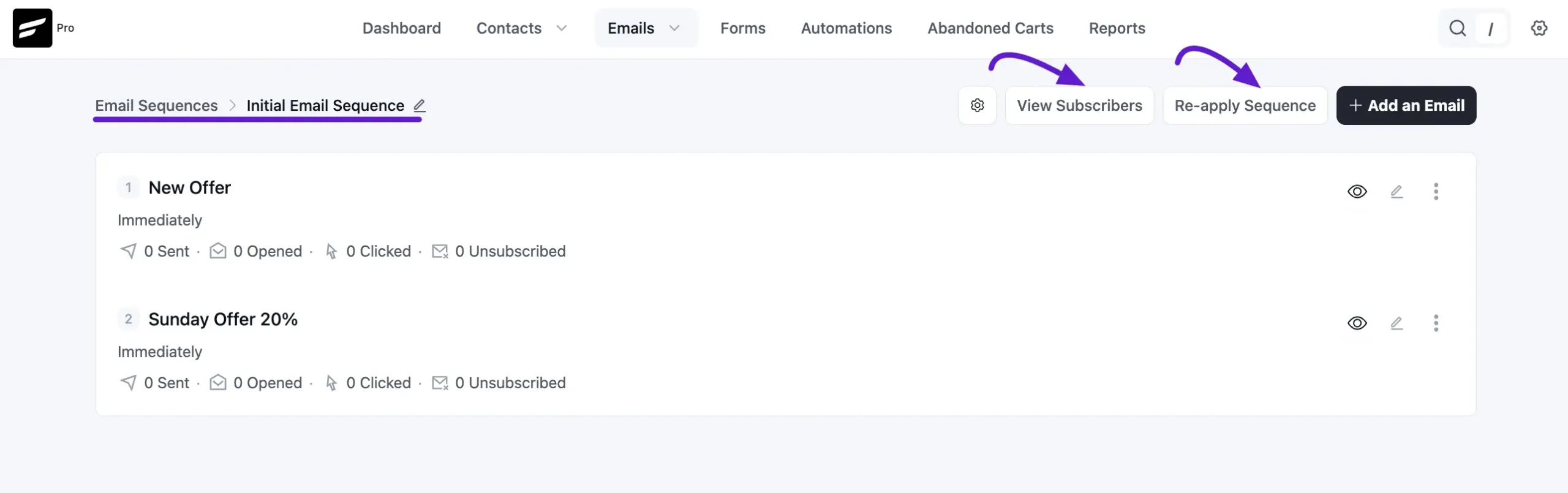
Here is the kind of series I would build for a service business: deliver the requested resource, share one practical tip, answer a common question, and invite the person to talk when they are ready.
An automation connects those steps to something that happens. A signup can start a welcome process. A tag can help direct someone to the right information. You plan the journey once, then the software follows your rules.
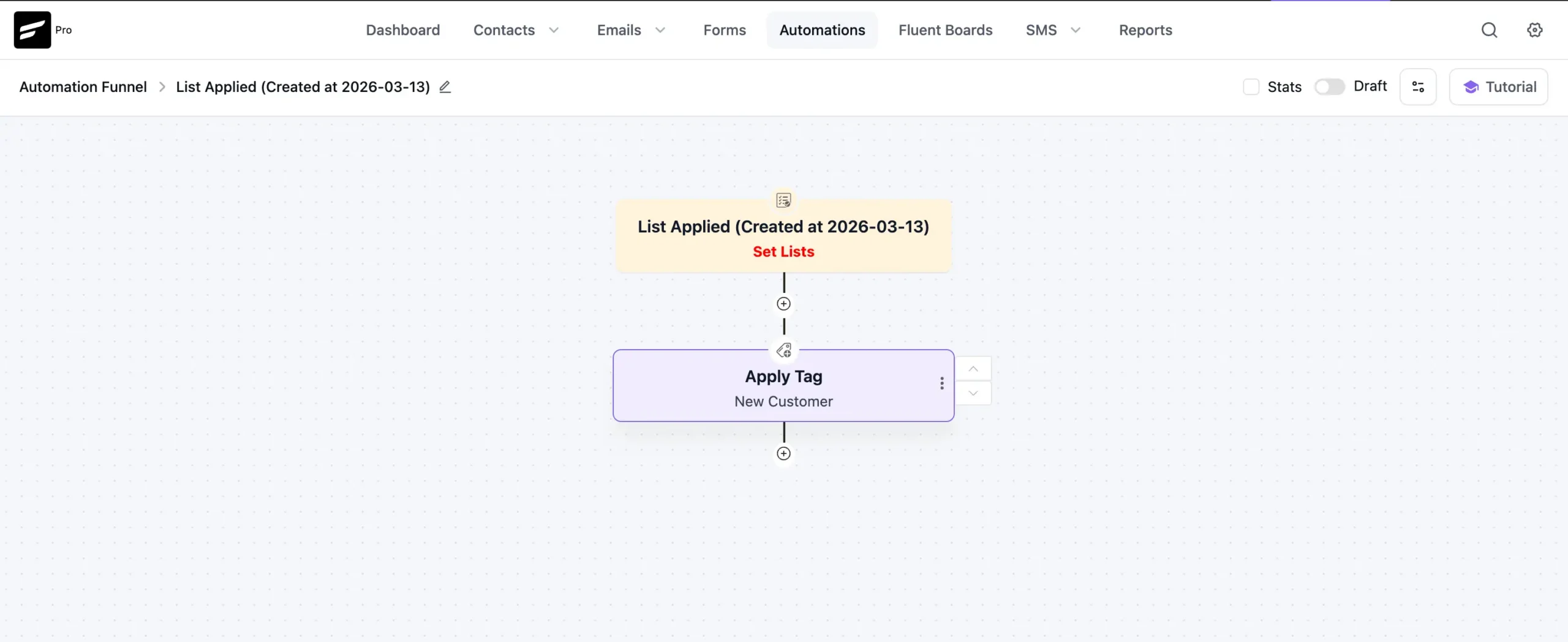
The visual layout helps you see the relationship between steps. That is useful when you want to answer a plain business question: what should happen after someone asks for this?
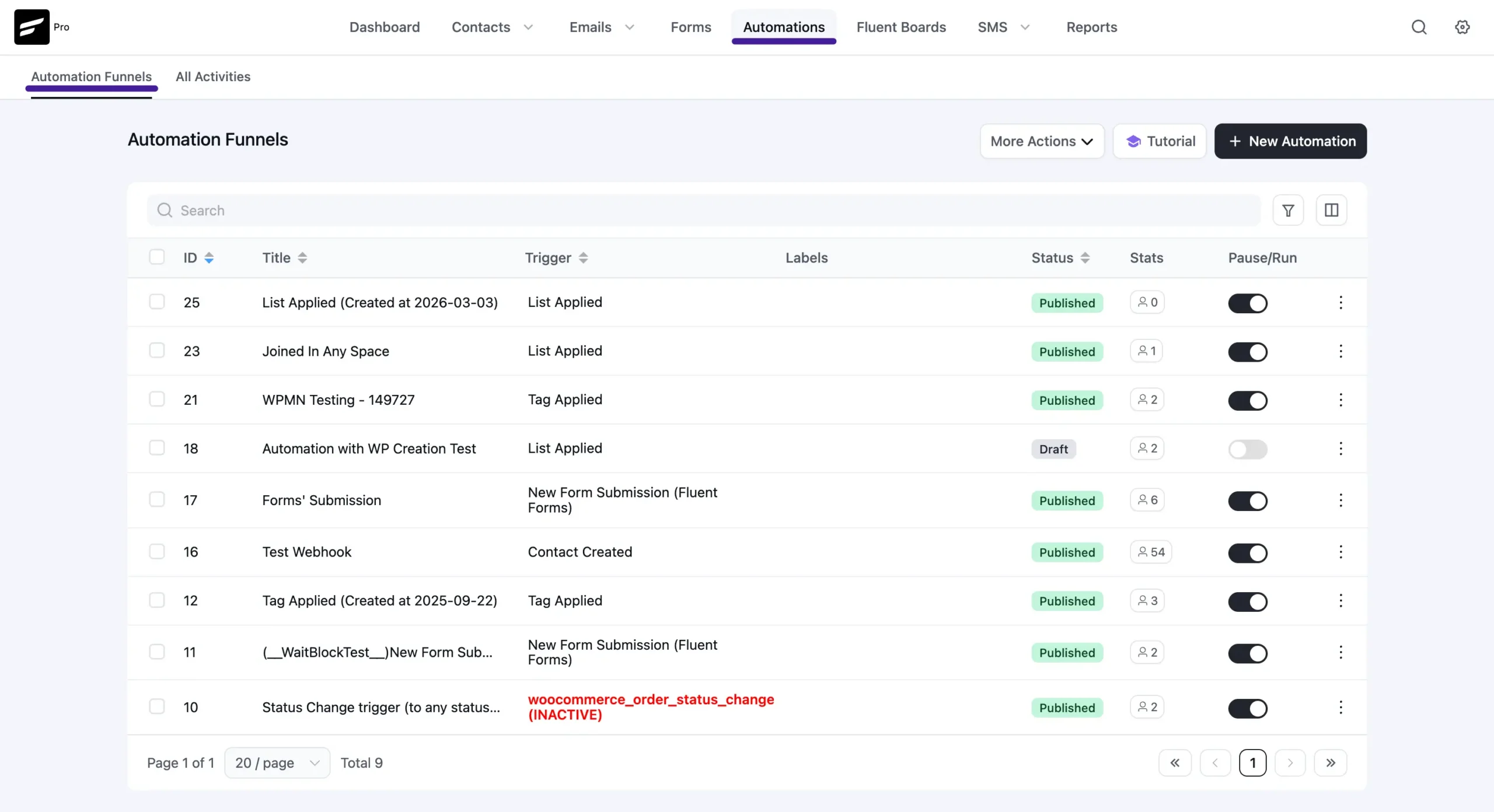
The free version includes basic automation. Pro gives you a wider range of actions, triggers, and integrations for more involved journeys. You can start small rather than trying to build your entire marketing plan on day one.
How we use it at Authority One Design
Our Business Growth Library shows why I like connecting the website and follow-up. Someone requests access, and the next step arrives by email. Fluent Forms and FluentCRM help connect those parts.
We tested that access-email journey with my own address and confirmed the message arrived. That particular test used an existing contact. It is a concrete example of our setup, rather than a claim that we have tested every possible signup or integration.
More broadly, we like having control over how contacts are organized and how follow-up fits our website. FluentCRM works well for us, and that is why I am comfortable recommending it.
It also has a different job from Moxie, which we use for client projects, agreements, and invoices. FluentCRM takes care of the marketing relationship that begins on the website.
The Fluent family makes the whole setup more useful
One reason I like FluentCRM is the family of tools around it. You can add what your business needs rather than buying everything at once.
Fluent Forms: an easy way for people to raise their hand
Fluent Forms gives you a visual way to build signup and contact forms. Its free version is useful for getting started; advanced features have their own Pro options. Connecting a form to your contact system means an interested visitor can have a clear next step instead of becoming another message to copy into a spreadsheet.
FluentCommunity: keep members and conversations on your site
If you teach, coach, or run a membership, FluentCommunity adds spaces for members, discussions, and courses inside WordPress. It is a separate product with its own plans. It broadens what you can build around the same website, and its FluentCRM connection can bring the member experience and email follow-up together.
FluentSMTP: a free connection for sending your emails
FluentSMTP is the free plugin that connects WordPress to supported email sending services. At AOD, we use it with Mailgun. The connector is free; your chosen sending service may charge based on usage. More on that in the optional technical section below.
A company whose tools work well together
WPManageNinja is the company behind this family. I like the direction: useful business tools that work within WordPress. The shared ecosystem is a real reason to consider FluentCRM, especially if you already use another Fluent product. Check each product’s features and license separately; they are not all bundled into one purchase.
What is free, and when does Pro make sense?
The free version is a working starting point, not just a short trial. Pro makes sense when you want deeper follow-up or connections to more of the tools your business uses. Here are a few important differences from the official Free versus Pro comparison.
| Feature | Free | Pro |
|---|---|---|
| Contacts, lists, and tags | Unlimited | Unlimited |
| Send and schedule campaigns | Included | Included |
| Automation | Basic tools | More triggers, actions, and integrations |
| Dedicated email sequences | Not included | Included |
| Visual drag-and-drop email builder | Not included | Included |
| Subject-line A/B testing | Not included | Included |
You can create unlimited campaigns, lists, and tags without buying Pro. That does not mean every advanced workflow or integration is free. Choose the version that supports the follow-up you actually want to run.
The big advantage: no subscriber-based plugin price increases
This is worth repeating. With FluentCRM, your plugin license does not get more expensive because your list grows from hundreds of people to thousands. Pro pricing is based on the number of websites, not subscribers.
The official pricing page currently lists regular annual Pro prices of $129 for one site, $249 for five sites, and $499 for fifty sites. The one-site price works out to $10.75 per month, billed annually. First-year discounts are currently advertised; check both the initial price and renewal.
Many hosted email platforms charge more as you move into larger contact bands. FluentCRM removes that particular rising cost. I love being able to grow the audience without also watching a subscriber-based plugin bill climb.
You still have website hosting and email sending costs. A larger list may mean sending more emails, which can increase the sending-service bill. The advantage is the flat plugin license—not a promise of free unlimited delivery.
FluentCRM compared with five popular alternatives
Here is a useful starting comparison, checked October 5, 2026. These are different kinds of products: hosted platforms include an email sending allowance, while FluentCRM runs on your WordPress site and needs a sending connection. The linked sources let you check current limits before choosing.
On a small screen, swipe sideways to see the full comparison.
| Platform | Free starting point | Growing your business |
|---|---|---|
| FluentCRM | No contact cap; unlimited campaigns, lists, and tags. Sending service separate. | Flat Pro license by website count. More subscribers do not raise the plugin price. Best fit: a WordPress business wanting control. |
| MailerLite | 250 subscribers, 2,500 emails per month, three automations. | Paid plans depend on subscriber and sending needs. A hosted option for people wanting email delivery in the same service. |
| Mailchimp | 250 contacts; 500 sends per month, with a 250-per-day limit. | Monthly contact tiers and feature plans. Check the cost at your expected list size and the follow-up features you need. |
| Brevo | Up to 100,000 stored contacts; 300 emails per day. Automation limited to 2,000 unique contacts. | A generous contact allowance, with a daily sending cap. Consider the paid plan when sending volume or automation grows. |
| Kit | Up to 10,000 subscribers and unlimited broadcasts. | A strong free newsletter option. Paid Creator adds unlimited sequences and visual automations; paid pricing varies with subscriber count. |
| ActiveCampaign | A trial, rather than a free ongoing plan. | Paid contact bands and feature tiers. Starter limits automations to five actions; higher plans offer deeper automation. |
Kit and Brevo deserve credit for generous free allowances. FluentCRM does not need to win every free-plan comparison to be a great choice. Its combination of WordPress control, unlimited contacts, and flat Pro licensing is what makes it stand out for me.
When comparing paid plans, write down your likely list size a year from now. Then check the features you need at that size. A low starting price can look quite different after your audience grows.
Also compare the full working cost. Hosting, sending, and any setup help belong in FluentCRM’s total. Hosted platforms handle more of the infrastructure for you, which has value too.
The good, the bad, and the ugly
The good: control, value, and follow-up that belongs with your website
For me, the strongest benefits are the generous free starting point, the flat license price, and the connection to our own website. We use it, we enjoy it, and it does a great job for AOD. The wider Fluent ecosystem makes it even more useful.
The bad: beginners still have a few things to learn
If you have never used an email platform, tags and automation will be new. That is true of the category, not just FluentCRM. Start with one audience and one useful follow-up. Learn the basics or have someone help you. This is too important to your business to abandon because the vocabulary is unfamiliar.
It is also built for WordPress. If your business uses another website platform, a hosted email service may be the more practical choice. Some advanced FluentCRM features require Pro, so the free version will not cover every plan.
The ugly: buying software without giving people anything useful
An elaborate funnel full of empty sales messages will still be an elaborate funnel full of empty sales messages. FluentCRM gives you the tools; your business needs to bring the useful advice and a clear offer.
Keep the plan simple enough to maintain. Review messages when your offers change, and respect people who unsubscribe. Those habits matter whichever platform you choose.
For geeks and techies: the setup behind the scenes
FluentCRM runs within WordPress, so hosting, backups, updates, and access permissions matter. Installing the plugin is the easy first step. The other important piece is connecting a suitable email sending service.
FluentSMTP handles that connection for supported providers. We use Mailgun, but you have other choices. Provider costs depend on the service and usage. Setting up your sending domain correctly helps mail services recognize your messages.
Before launching a journey, check a fresh signup, any confirmation email, the messages, links, timing, and unsubscribe behavior. Our existing-contact library test was one check; a new-contact journey needs its own test.
This is setup work you can learn or delegate. You do not need to become an email engineer to use the system day to day. Once the foundation is working, the ongoing job is mainly planning helpful messages and checking that they still serve your business.
My recommendation: start using email follow-up
If you have a WordPress website and no consistent email follow-up, I would put FluentCRM near the top of your list. Try the free version, give people a useful reason to subscribe, and build one clear welcome journey.
Do not wait until you understand every feature. Start with something manageable. Upgrade when you need Pro’s sequences, wider integrations, or deeper automation.
Want help connecting your forms, organizing your contacts, and building follow-up that sounds like you? That is something we can help with at Authority One Design. You bring the business knowledge; we can help turn it into a system that works for you.
