
 Good work.


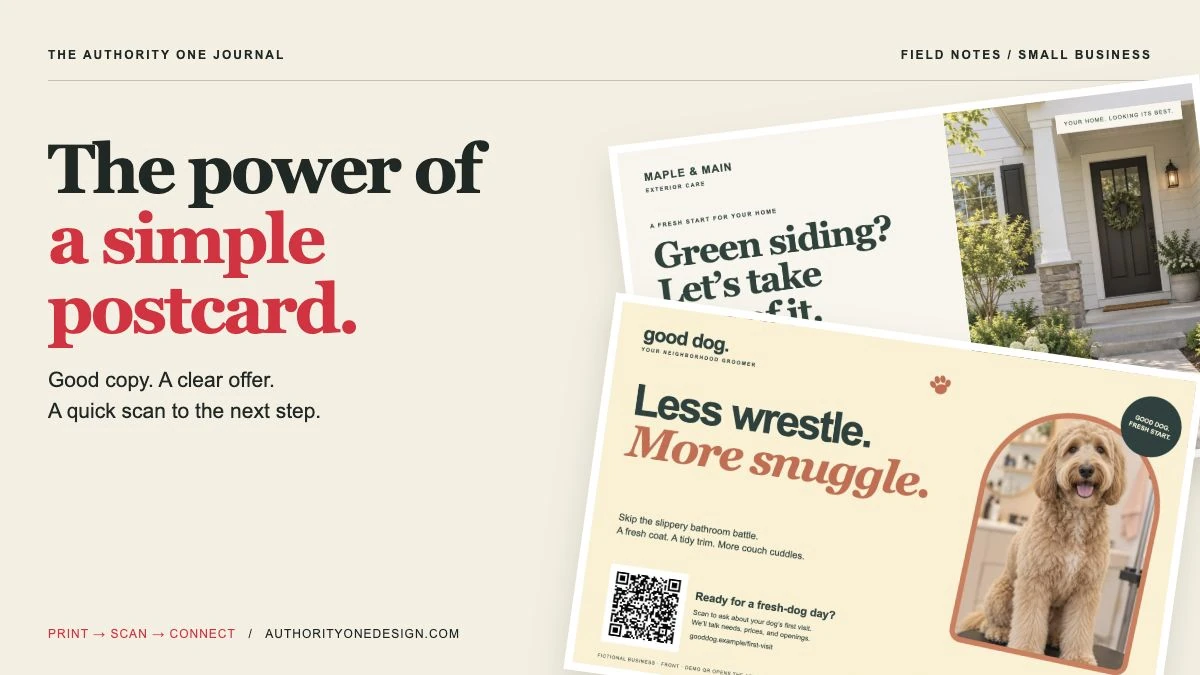
Jump to: Write the message · Add a QR code · House-washing example · Grooming example · Print and mail it · Track the results
Your next customer still has a mailbox. And a well-written postcard can give them a reason to remember your business, visit your website, or pick up the phone.
When every marketing conversation seems to be about algorithms, AI, and whatever social platform changed its rules this week, a postcard can feel almost too simple. That simplicity is part of its appeal. You can put one useful message in front of people in the area you actually serve.
I’ve spent more than 25 years working in design and direct response, including sales pages, ads, and postcards. The lesson carries across all of them: give the right person a clear reason to take the next step. A beautiful design helps. A clear message gives that design a job.
And today, that next step can be as simple as pointing a phone at the card. A QR code takes someone straight to your estimate form, appointment page, or offer. No long web address to type. No guessing where to click once they get to your website.
Let’s build the whole thing: the message, the design, the QR code, the page it opens, and a simple way to see whether the mailing brought you business. I’ll show you two original postcard campaigns along the way.
A postcard can do something your next social post might not
It can reach a nearby customer who has never heard of you. They don’t need to follow your account. There’s no envelope to open. And if the message fits a need they already have, they may leave the card on the counter until they’re ready.
Picture a homeowner who keeps noticing the green buildup on the siding. Or a dog owner who dreads another slippery bathroom bath. You don’t need to create a problem. You need to show them an easy way to take care of one.
That doesn’t mean every mailing will pay for itself. The people you reach, the offer, the cost, and your follow-up all matter. I’d start with a small test you can afford, then let the results tell you what to do next.
The postcard earns their attention. The QR code gets them to your page. The page makes it easy to reach out.
Before you design anything, decide who should get it
Finish this sentence: “I want to reach these people, in this area, about this one service.”
A house-washing company might pick a few nearby neighborhoods. A grooming salon might start with past customers who haven’t booked in a while. Both can use postcards, but they don’t need the same mailing list.
Want to reach a whole neighborhood? Look at USPS EDDM.
Every Door Direct Mail, or EDDM, delivers to the mail carrier routes you choose. Its planner shows neighborhood details to help you pick routes. It does not tell you which homes have dogs or which people are ready to hire you.
EDDM Retail has a minimum of 200 pieces and a limit of 5,000 per day per ZIP Code. It doesn’t require a special mailing permit, but your cards and mailing still have to meet the rules. Start with the official USPS guide and route planner.
I’d use this when a good share of the households on a route could need the service. If only a few are likely to fit, reaching everyone may cost more than it helps.
Want to reach certain people? Use an addressed list.
You can mail to an appropriate customer list you already have, or ask a provider for a list that matches your needs. A commercial cleaner needs business addresses. A dog groomer may want to ask about pet-owner lists and how that information was gathered.
Ask how fresh the list is, which filters you can use, whether you can keep it, and whether you can mail to it again. Remove repeat entries and honor requests to stop sending mail. A big list of the wrong people is still the wrong list.
Don’t overlook people who already know you.
A seasonal reminder or a useful reason to come back can make a good first test. “Ready for your dog’s next grooming visit?” makes more sense for a past customer than a long introduction to your salon.
One problem. One useful solution. One easy next step.
A postcard doesn’t have room for your entire company story. It has room for one good conversation. Here’s the outline I’d start with:
- Name the problem. Use words your customer would use: green siding, a shaggy dog, a bathroom they hate cleaning.
- Show the relief. What gets easier or better when you help? A cleaner home. A fresh coat. A weekend with one less chore.
- Give them a reason to feel comfortable. Use real proof, a clear process, or an offer they can understand.
- Ask for one next step. Scan for an estimate. Request an appointment. Then explain what happens.
You may have heard this called “pain and solution.” You don’t have to make the pain bigger to make the offer useful. Dirty siding isn’t a crisis. Be clear and helpful, and let the service make sense.
You also don’t have to lead with a discount. A clear estimate or an easy first visit can be the offer. If you do use a promotion, state the real terms. A deadline or “only three spots left” belongs on the card only when it’s true.
For more on this approach, read my guide to direct-response marketing for service businesses.
Put a QR code on the postcard. Make that next step easy.
This is one of the best ways to connect a printed card to your website. Someone sees your offer, opens the camera on their phone, and scans the code. A tap takes them to the exact page you want them to see.
They don’t have to type a long address and risk a mistake. They don’t have to remember the offer until they get home. And you don’t have to send them to your homepage and hope they find the right service.
For a postcard that sends people to a website, a QR code belongs in the design. I’d put it beside the offer on the front and repeat it near the response instructions on the back. Keep a short web address and a real phone number too. Scanning should be the easiest option, with other ways to reach you for people who prefer them.
Tell them what they’ll get when they scan.
A little square by itself isn’t much of an invitation. Give it a job:
- House washing: “Scan for your house-washing estimate.”
- Dog grooming: “Scan to ask about your dog’s first visit.”
- Home cleaning: “Scan to see what’s included and request a quote.”
That’s more useful than “Scan me.” It answers the question people are asking: Why should I bother?
Postcard → quick scan → matching page → one clear action.
Keep the same offer all the way through.
How to scan a QR code on your phone
You can use these steps yourself, or turn them into a short instruction on the card: “Open your camera. Scan. Tap the link.”
On an iPhone:
- Open the Camera app and use Photo mode.
- Point it at the QR code so the whole square fits in the view. Hold still for a moment. You don’t need to take a photo.
- Tap the link that appears to open the page.
Apple also has a Scan Code option in Control Center. See Apple’s scanning instructions.
On a Google Pixel or many Samsung phones: open Camera, point it at the whole code, wait for the link, and tap it. If the camera doesn’t recognize it, check the QR-scanning setting or look for “Scan QR code” in Quick Settings. Phone menus vary; these are the Pixel steps and Samsung steps.
If it won’t scan: get better light, avoid glare, clean the camera lens, and move the phone a little closer or farther away. Keep the full code in view. Your phone also needs an internet connection to open the website.
Three free places to make a QR code
You don’t need a paid QR service just to send someone to your website. These are useful starting points. I checked the provider pages on October 5, 2026; check the current options before you commit to a large print run.
- Adobe Express: paste in your web address, generate the code, and download it. Adobe’s generator makes free static codes, meaning the address inside the code stays fixed.
- QRCode Monkey: makes free static codes for business use, with PNG and vector download options. Choose the URL option and keep the code simple. Its separate paid products aren’t needed for this basic job.
- Canva: handy if you’re already designing there. Its own generator currently offers both static and dynamic codes for free. Check branding, export options, and the terms of the generator you use; a third-party QR app inside Canva may have different rules.
Static or dynamic? A static code contains a fixed address. A dynamic code uses a service that can change where it sends people. That can be useful, but check whether it depends on an account, a trial, a paid plan, or other limits. Don’t find out after the cards are mailed.
A simple static code can work well. It doesn’t need a QR subscription to keep its pattern valid. The website it points to still needs to stay online. Keep that page working for as long as someone might save the card.
Make your code in five steps
- Choose the page first. Use the page for this offer, not a general homepage. For example, your own site followed by
/washor/first-visit. - Open that address on your phone. Make sure the page loads, the offer is right, and the form or booking link works.
- Paste the full address into the generator. Include
https://. Generate one clear code with dark squares on white. - Download a sharp file. An SVG or suitable PDF can stay crisp at print size. If you use PNG, ask your printer what resolution they need. Don’t use a tiny screenshot.
- Add it to the card and test the final proof. Scan the actual printed sample with more than one phone. Follow the link, send a test request, and confirm it arrives.
A useful extra: you can keep a short address on your own site and have it forward visitors to your campaign page. If the offer moves, you can update that forwarding rule without changing the printed code. Someone needs to set up and test that rule on your website; a static QR code doesn’t do it by itself.
Give the code room to work.
For a hand-held postcard, I’d start with a code about an inch square, including its white border, then test the printed proof. A code with lots of tiny squares may need more room. That is a starting point for design, not a size that guarantees every phone will read it.
Keep the blank border around it. QR-code developer DENSO WAVE specifies a clear margin at least four small code squares wide on every side. Don’t squeeze text into that space, place the code over a photo, stretch it, or let the printer trim it.
Fancy colors, logos, and shapes can wait. A simple black code on white is a good place to start. A clever design isn’t doing its job if the customer can’t scan it.
Example 1: A house-washing postcard with a clear job
These are original teaching designs for fictional businesses. The photos are generated illustrations. They aren’t client campaigns or evidence of results. The business web addresses are placeholders. The real demo QR codes link to the matching example in this article once it is published, not to a working estimate or booking form. Use your own live landing page and contact details for a real mailing.

The front: “Green siding? Let’s take care of it.”
You can picture the problem right away. The photo keeps the focus on the home. “Keep your weekend off a ladder” gives the customer a reason to care beyond clean siding.
The QR code sits beside “Scan for your house-washing estimate.” The reader knows what the scan is for. The short instruction tells them how to do it. The printed address gives them another way in.

The back: make asking for an estimate feel easy.
“Tell us your address and what needs cleaning” gives them a small first step. Checking the service area and explaining what happens next removes some of the guesswork. The repeated code keeps the response easy, whichever side they read first.
For a real business, this is where I’d use a genuine project photo, a relevant customer quote, or a true credential. No made-up rating. No promise that every stain will vanish. Only claims the owner can stand behind.
The outline in action: green siding is the problem; a cleaner home and one less chore are the relief; a clear estimate process builds comfort; scanning to request an estimate is the next step.
Who gets the card? A small set of nearby routes where the homes and travel distance fit. Check the route counts and your ability to take on work before ordering.
What should the scan open? A house-washing page with the same offer, real work photos, your service area, and a short estimate form. Ask for the details you need to follow up, then explain when they’ll hear from you. Make the phone option easy to find too.
Example 2: A dog-grooming postcard with some personality

The front: “Less wrestle. More snuggle.”
This one gets to have a little fun. The dog portrait, warm colors, paw detail, and big headline feel like a neighborhood pet brand. It doesn’t need to look like the house-washing card with a different photo.
“Skip the slippery bathroom battle” names something a dog owner may know all too well. A fresh coat and more couch cuddles give them a simple picture of the benefit.
Then the QR invitation does the practical work: “Scan to ask about your dog’s first visit.” It explains that they’ll talk about needs, prices, and openings. You’re asking them to start a conversation, not hand over a credit card without knowing the details.

The back: show that their dog matters.
“Every good dog has a different story” sets up the questions an owner may have. A first trim, a shaggy coat, and a dog who needs patience aren’t the same visit. Asking about breed, size, and coat helps make the next conversation useful.
The promise stays clear: explain options, pricing, and available appointments before they book. Don’t promise every dog will love grooming. A request also isn’t a confirmed appointment, so say that plainly.
The outline in action: a difficult home bath is the problem; a clean coat and an easier day are the relief; a conversation about the dog’s needs builds comfort; scanning to ask about a visit is the next step.
Who gets the card? Past customers may be a good first group for a reminder. For a new-customer mailing, ask how a provider finds pet-owner addresses. EDDM reaches nearby homes, but it won’t tell you which ones have dogs.
What should the scan open? A grooming page with real salon and team photos, helpful pricing guidance, and a short first-visit request. Ask for the dog’s breed, size, and needs, plus the owner’s contact details. Explain how the salon will follow up.
Write your own first draft in 15 minutes
Don’t start with a blank page and “What should we say?” Fill in these lines first:
- I’m speaking to: [a certain customer in my service area].
- They’re dealing with: [one problem or wish].
- I help them: [get a useful, realistic result].
- They can feel comfortable because: [real proof or a clear process].
- The next step is: [one action and what happens afterward].
- The QR code opens: [the live page for that exact offer].
Now read it out loud. Would you say it to a customer standing in front of you? Trade “comprehensive solutions” for the name of the service. Trade “contact us today” for what you want them to do.
Give the customer’s reason to care the biggest headline. Make your business name easy to find. Let the QR code and its label make the next step obvious.
Where to get the cards printed and mailed
You can handle the mailing yourself, hire a local printer and mail house, or use a provider that does most of it for you. These are places to compare. Get a fresh quote for your actual order; the cheapest printing price isn’t always the cheapest mailed campaign.
PostcardMania: help with several parts of the campaign
PostcardMania offers design, printing, mailing lists, and mailing services, including EDDM. It also offers packages with digital advertising. Ask what is included, what is optional, and whether there’s an ongoing commitment. You don’t need every extra to run a useful first test.
VistaPrint: design, print, and send addressed postcards
VistaPrint’s postcard mailing service can print, address, and mail the cards. It offers options to use your own list or buy a list through the service. VistaPrint keeps purchased lists in its system and currently allows reuse for one calendar year; it does not release those addresses to you. Check the current terms before buying. Follow its mailing template for the address and postage areas.
USPS EDDM: pick the routes and arrange production
USPS EDDM handles delivery, not printing. You arrange the printing and preparation yourself or get help. The USPS printer directory is another place to look for production help.
I’d also ask a local print shop whether it handles mailed campaigns. Someone who can review a paper proof with you may be useful for a first run.
Ask for the whole price.
Your quote should cover design, printing, the list or routes, address checking, mailing preparation, postage, shipping or drop-off, and taxes. Ask about order minimums too. A low price per printed card doesn’t tell you what it costs to reach a mailbox.
Ask who checks postal rules, whether you can see a physical proof, what happens to mail that can’t be delivered, and how far ahead to order. Treat a vendor’s success story as something to learn from, not a promise for your business.
Here’s a message you can copy when asking for quotes.
“I’m planning a postcard mailing for [service] in [area]. Please quote [quantity] two-sided cards, including printing, the list or routes, address checking, mailing preparation, postage, delivery to USPS, and taxes. Please explain any minimum order or ongoing commitment.
“I’m considering [EDDM / an addressed list]. Which size and paper stock fit the mailing rules? Please send your artwork template. Can I approve a printed proof and test its QR code? What are the production and estimated delivery times? Who checks the final card before it goes to print?”
Send the same request to each company. Compare the same size, quantity, paper, and mailing plan so you can see what you’re really getting.
Know what a good result would look like before you spend.
Let’s use made-up numbers to show the math. This isn’t a printing quote or a forecast:
- The whole campaign costs $900.
- An average first job brings in $300.
- Doing that job costs you $150 in direct labor, supplies, and other job costs.
- That leaves $150 per job toward marketing and the rest of your business costs.
In this example, $900 divided by $150 means six completed, paid jobs would cover the campaign before your other business costs. Six scans wouldn’t. Six phone calls wouldn’t. And the mailing may bring fewer than six jobs.
Use your real numbers. Include discounts, fees, supplies, and the time it takes to do the work. Repeat customers can matter, but don’t count years of future purchases as money you’ve already earned.
Pick a first run you can afford to learn from. Decide when you’ll review it and who will answer the requests. Sending more cards won’t fix a weak offer or a form nobody checks.
Don’t let a good postcard lead to a confusing page.
If the card says “Get your house-washing estimate,” the page should help them get a house-washing estimate. Keep the offer, headline, and look connected so they know they’re in the right place.
You don’t need a giant page. You do need five things:
- The same service and offer they just read.
- Real photos or useful proof to help them trust the business.
- Your location or service area.
- A short explanation of the process, price guidance, and any important terms.
- One easy action with a phone option for people who prefer to call.
Test it on your phone. Can you read it and find the form without zooming? Does the form work? Does the thank-you message explain what happens next?
Try the homepage stranger test on that page. You can also see how clearer messages and better design come together in real client projects.
Keep a simple record: who responded, and who hired you?
QR scans and page visits help show interest. To decide whether the mailing was worth doing, also follow the requests through to paid work. USPS has a useful guide to tracking direct mail, including QR codes, web addresses, phone numbers, and offer codes.
Here’s a setup you can actually keep up with:
- Use a page or link for this mailing. Give it a short address on your own site. Send the QR code and printed address to the same offer.
- Mark where visitors came from. Your web person can add a small tracking label to the link so Google Analytics can recognize the campaign. Use a different label for each mailing.
- Count real requests. Record forms that arrive, appointment requests, and actual phone calls. A tap on a phone button doesn’t prove a call happened.
- Ask callers a simple question. “How did you hear about us?” Write down what they say.
- Follow the request to the end. Did it fit your service and area? Did they book? Was the job completed and paid? What did it cost to do?
For you or your web person: the optional tracking label
A campaign link can end with ?utm_source=postcard&utm_medium=direct_mail&utm_campaign=fall_house_wash. These labels tell analytics the source, type of marketing, and campaign name. They don’t need to appear as a long address on the card. A short forwarding link on your own site can open this longer address. Test that it keeps the labels. Use them on incoming campaign links, not normal links between pages on your website.
Track a form after it was successfully sent, rather than only a button click. Your customer record or lead sheet still needs to record bookings and paid jobs.
You won’t know everything. Someone might scan, come back later through Google, or hand the card to a neighbor. Some visits won’t show up in analytics. Use your records and what customers tell you together.
A free tracking sheet to keep it all in one place
Download the postcard campaign tracker →
Open it in Excel, Google Sheets, or Numbers. Record the mailing, each request, whether it fit, whether the person booked, the paid amount, and the cost to do the work. Keep the total campaign cost beside it. The sheet starts blank so you can use your own numbers.
Before you order: a quick check that can save a lot of money
- Confirm the mailing size first. A standard 4 × 6 card doesn’t automatically qualify for EDDM. Have your provider check the size, paper, weight, and layout for the mailing method.
- Use the printer’s template. Keep text away from the cut edge and leave the address, barcode, and postage space clear. The examples here need a real mailing template before production.
- Send the right print file. Ask about PDF settings, color, and image quality. These WebP examples are for reading online, not files to send straight to a printing press.
- Print a proof at the final size. Read it at arm’s length. Make sure the smaller text is easy to read on paper.
- Scan both sides. Test the final printed QR codes on more than one phone. Open the page, send a request, and confirm it reaches you. Check the typed address and phone number too.
- Check what keeps the code working. Keep the destination page live. Know whether a QR service depends on a trial, account, or subscription.
- Check every promise. Verify photos, reviews, prices, terms, deadlines, and the area you serve.
- Have someone ready to reply. Decide who checks requests and what customers should expect next.
After the first mailing, let the results guide the next one.
Give people time to respond and jobs time to finish. Pick a review window that fits the service and buying decision. The first afternoon won’t tell you the whole story.
- Visits but few requests? Check the page, offer, and form.
- Requests from the wrong people? Check the list, service area, and wording.
- Good requests but few bookings? Check prices, openings, and how you reply.
- Jobs that don’t cover the cost? Look at the cost of the campaign and the money each job leaves.
A second mailing may catch someone at a better time. Give it a budget and a reason. Change one big thing at a time when you can. If you change the offer, design, audience, and season all at once, it’s hard to know what helped.
A few questions before you start
Should every postcard have a QR code?
For a card that invites people to a web page, yes—make it a standard part of the design. Put a clear reason to scan beside it. Keep a short address and phone number so people can also respond another way.
Do I have to pay to keep the QR code working?
Not for a basic static code that contains your own web address. Keep that website and page online. If you choose a service that forwards the scan or changes the destination for you, check its account rules and ongoing terms first.
Do I need a discount?
No. Start with a useful service and an easy next step. If you offer a discount, make sure you can still afford the work and mailing, and state the terms plainly.
How many cards should I send?
Enough for an affordable test that meets the mailing requirements. The right number depends on the list or routes, the cost, the value of a job, and how much work you can handle. There’s no magic number that guarantees customers.
Should I list all my services?
I’d usually lead with one service or a closely related package. A little supporting detail is fine. A list of twelve unrelated services makes the reader work too hard to find a reason to care.
Can I do this myself?
Yes. Use the writing outline, choose your landing page, make the code, get a mailing template, and work through the print checklist. Start small enough to learn without betting the business on it.
If you’d like a hand with the message, design, or page the code opens, tell me what you’re planning. And if your website needs a fresh start, you can request a free homepage preview.
