
 Good work.


Someone asks for your free guide. You send the link. They get the file.
Good start. Now what?
I can see why this part gets put off. You’ve already done the work of making the guide, putting it on your website and getting the signup to work. Then there’s another empty email waiting for you to write something.
“Just checking in” might get you through the first sentence. It doesn’t give you much to put in the second.
I’d start with the reason that person asked for the guide. What were they trying to understand? What decision were they working toward? Your next few emails can help them along with that.
That’s what I’d want from an automated welcome sequence: a short series of useful emails that introduces how you think, answers a few questions and gives someone a clear way to ask for your help.
Keep the conversation they signed up for.
Let’s carry on with the landscaping example from my article about creating a more useful free offer. The download is a one-page checklist for comparing landscaping quotes.
The person asking for it may be thinking about a new planting bed, a front-yard refresh or some work around a patio. They want to understand what they’re paying for before choosing someone.
That gives us plenty to talk about. What’s included in a quote? Why might two prices be different? What should a homeowner have ready before asking about the work?
I’d keep the emails close to those questions. Someone who asked about comparing landscaping quotes has given you a useful starting point for the conversation.
And I’d tell them what they’re signing up for beside the form. If you plan to send a short series of planning tips followed by occasional emails, explain that there. Then make sure your welcome email tells the same story.
How many emails would I send?
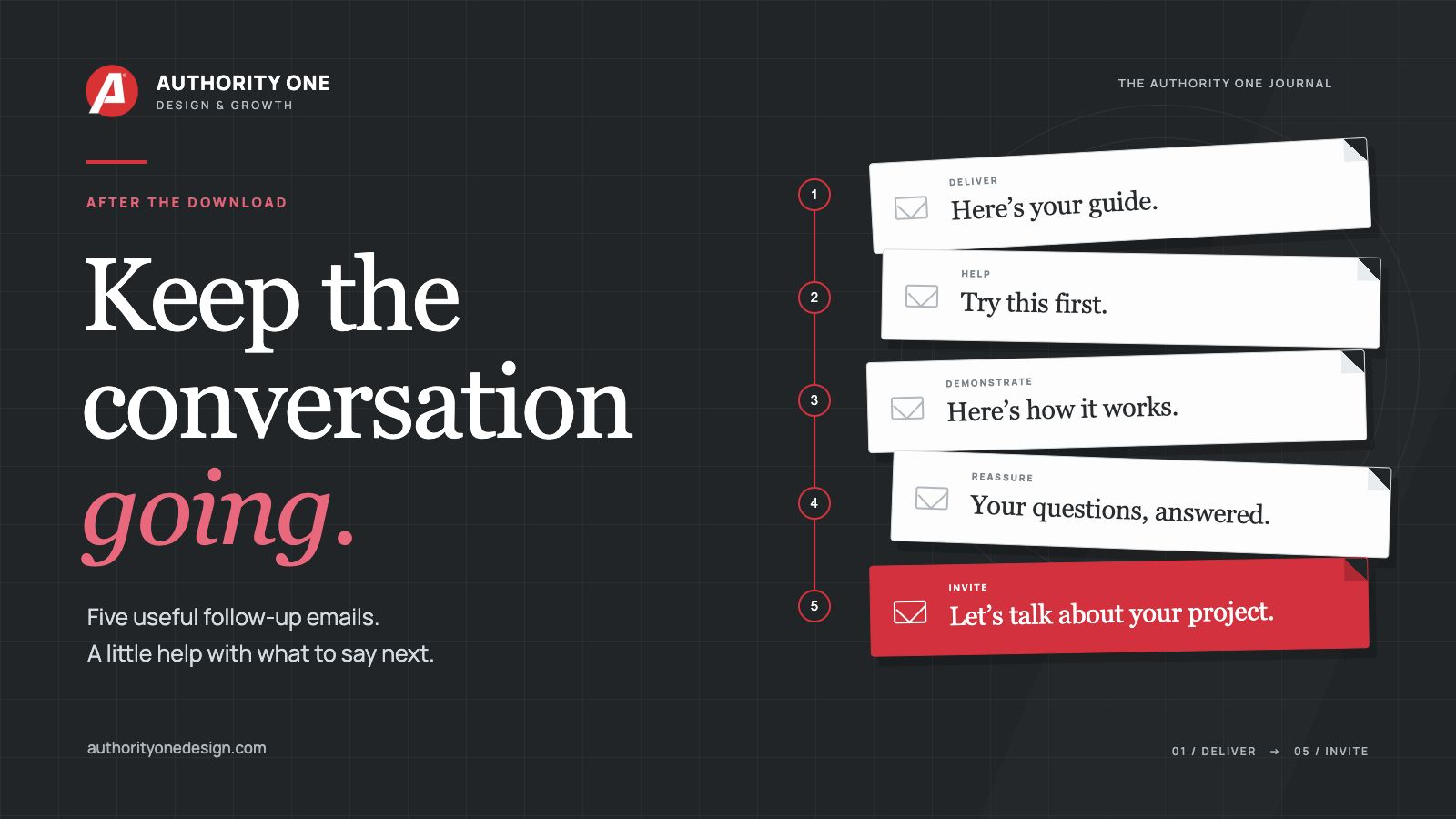
I’d start with five, including the email that delivers the guide. For this example, I’d send them immediately, then two, four, seven and ten days after signup.
That gives us room to deliver the resource, offer a quick win, show our thinking, answer a hesitation and make an invitation. Each email has a reason to be there.
Those days are a starting schedule to try. Your customers, the service you offer and the follow-up you promised should shape the pace. Kit’s welcome-email guidance describes several lengths and schedules, with testing to see what fits. Five isn’t a magic number.
Here’s how I’d write the five for our landscaper. Swap in your own name, working links and the way your business actually handles inquiries. The bracketed links below show where your real links would go.
Email 1: Give them what they came for.
This one should arrive as soon as the signup and any required confirmation are complete. Make the checklist easy to find. A little welcome is lovely, but I’d save the full company history for another day.
Hi there,
Thanks for requesting the landscaping quote checklist. Here’s your copy:
[Link: Download the quote-comparison checklist]
Keep it beside you when you look through your estimates. It gives you a place to compare the work, materials, preparation, cleanup and terms, so you can spot anything you need to ask about.
Start with the work included. Two prices are much easier to compare when you know whether they cover the same job.
Over the next ten days, I’ll send four short notes to help with that planning. After that, you’ll hear from me occasionally with landscaping tips. You can unsubscribe whenever you like.
Thanks,
[Your name]
Notice that we’ve given them something small to do with the checklist. They don’t have to finish a project plan to get started. They can look at the first part of a quote.
We’ve also explained the emails coming next. That expectation should match what the person saw when they signed up.
Email 2: Help them use one part of it.
A couple of days later, I’d pick one question from the checklist and make it easier to answer. There’s no need to rewrite the whole guide in an email. Give them a useful place to look.
Hi there,
If you’re comparing landscaping quotes, take a look at what happens before the new plants or materials go in.
Does the quote say who removes the existing plants? Is any ground preparation included? What happens to the old materials and debris?
Then look at the other end of the job. Does cleanup include taking the waste away, or is that something you’ll need to arrange?
If you can’t find an answer, try asking: “Can you confirm what preparation and cleanup are included in this price?”
Write the answer on your checklist. That gives you something clearer to compare when you look at the next quote.
Here’s the checklist again if you need it:
[Link: Open the quote-comparison checklist]
Hope that helps,
[Your name]
That email gives the reader a question they can actually use. They’ve learned a little more about the decision they’re making, and they’ve seen that you pay attention to the details.
Email 3: Show the help in action.
A genuine client story can fit nicely here. Pick one that relates to the reader’s concern. Explain the situation, what you did and what the client actually said or experienced. Use it with their permission, and keep the outcome accurate.
A simple comparison can show your thinking, too. For this email, I’d walk the homeowner through two ways a quote might describe the same job.
Hi there,
Picture two quotes for the same planting bed.
One says: “Supply and install new plants.”
The other names the plants and sizes, describes the bed preparation and says what happens to the old shrubs and waste.
The first company might intend to do all of that, too. You just can’t tell from the wording.
I’d ask for those details before treating the two totals as prices for the same work. There may be a good reason for the difference. There may also be something that needs clearing up.
On your checklist, circle anything you can’t confirm from the quote. Those circles become your questions for the person providing it.
You don’t have to become a landscaper to ask what’s included.
[Your name]
That last line takes a little pressure off the homeowner. We’re showing them how to have a better conversation about the work.
If you use a testimonial instead, I’d still give the story that kind of context. “Great service!” is nice to hear. Knowing what the customer needed help with makes it easier for the next person to see themselves in the story.
Email 4: Take some mystery out of the next step.
By now, someone may understand the checklist and still feel unsure about contacting a landscaper. Perhaps they think they need a finished design, a list of plant names or a perfectly planned budget first.
This is a good place to answer one of those hesitations. Choose a question people really ask your business, and describe what you actually need to begin. Here’s a version for a business that can start with a short written inquiry.
Hi there,
If you’re thinking about landscaping work but haven’t settled every detail, you can still ask about the project.
Start with the part of the yard you want to change, what isn’t working for you and what you’d like to use the space for. A couple of photos can help explain it.
Maybe the front bed has become hard to maintain. Maybe you want more privacy beside the patio. You can tell us that in ordinary words.
If you have a rough budget or a date in mind, include those, too. And if you’re unsure about something, say so.
We can use that information to work out what we need to ask next and explain the next step. You don’t need to arrive with a folder full of plant names.
[Your name]
I like this kind of email because it helps someone picture getting in touch. It also gives the business a better starting point for its reply.
For a bookkeeper, the question might be whether the records need to be tidy before asking for help. For a cleaning company, it could be what happens during a first visit. Use the hesitation that belongs to your work.
Email 5: Give them a clear way to ask for help.
You’ve helped the reader make sense of their options. Now you can make a straightforward invitation to your service.
I’d connect it to the same project they’ve been thinking about throughout the emails. Tell them what to do and make the next step easy to understand.
Hi there,
I hope the quote checklist and these notes have made your landscaping plans a little easier to sort through.
If you’re ready to ask about the work, you can tell us what you have in mind here:
[Link: Ask about your landscaping project]
Let us know the area you want to change, what you’d like to do with it and any questions you’re still working through.
We’ll read through your details and let you know the next step, including anything else we need to understand the job.
If you’re still gathering ideas, keep the checklist handy. I’ll continue sending occasional planning tips, and you can get in touch when you’re ready.
Thanks for reading,
[Your name]
There’s an actual invitation there. We haven’t made someone guess whether we’re available to discuss the kind of work they’re considering.
We also haven’t invented a deadline to make the email feel urgent. If there’s a real seasonal cutoff or limited appointment availability, explain it accurately. The reader should be able to trust what you say.
What if they reply before email five?
Then you’ve got a conversation. Read it and answer the person.
That sounds obvious, but it deserves a place in the plan. If someone replies with project details after the second email, I’d review or pause the remaining sales invitations while we talk. Once they become a customer, the emails should fit that relationship.
This is where a “Client” tag can help. A tag is simply a label on someone’s contact record. Set up a rule so adding that tag stops their prospect sales sequence and moves them into the right client welcome or follow-up emails. Keep their contact record; change which messages they receive. The names and steps vary by tool, and the tag needs to be connected to those actions. A label by itself won’t necessarily stop the emails.
Keep each message understandable on its own, too. People won’t necessarily read everything. A quick reminder of the checklist or the question you’re discussing is helpful. “As explained in my previous three emails” gives them homework.
If someone opts out, stop the marketing emails. Keep the unsubscribe link easy to find. You’re aiming for a conversation they want to stay in.
Walk through it before someone else does.
Use an address you control and start at the signup form. Check the confirmation, the delivery email and every link. Read the examples on your phone. Make sure the name, business details and reply address are right.
Your email tool may count a delay from the previous message rather than from signup. Check the actual dates so “day seven” doesn’t accidentally become seven more days after the email before it.
Also check what happens when someone joins again, requests a second guide or becomes a customer. You want the resource to arrive without dropping them into the same welcome conversation twice.
Then keep an eye on the useful things: replies, working resource links, relevant inquiries and people choosing to unsubscribe. With a small list, you’re learning what people need. You don’t have to declare a winning formula after a handful of signups.
Start with one useful next email.
If the whole sequence feels like a lot, begin with the delivery email and the first helpful follow-up. Ask what someone could do with the guide today. Write that email as though you’re explaining it to one person.
Build the rest of the conversation from there. Help them use what they asked for, show your thinking, answer a real question and give them a sensible way to get in touch.
My free guide, Create a Free Offer People Want, helps you work through the offer and the follow-up together.
And if your website could use clearer words and a better path from first visit to inquiry, you can start with a free homepage preview.
You’ve already given someone a reason to raise their hand. Your next email is a chance to make them glad they did.
