
 Good work.


I love Moxie. I’ve tried HoneyBook, Dubsado, and Bonsai, and Moxie is my recommendation for a small business that sells services and manages client projects. The price is a big reason—but a cheap tool is only a good deal if it helps you do the work.
For me, the appeal is having the client relationship in one place: the inquiry, the agreement, the work, and the invoice. Those pieces belong together. When they’re scattered across email, documents, and separate apps, you spend too much time finding things and repeating yourself.
My verdict: Moxie is an excellent value for freelancers and small service businesses willing to spend some time setting it up. The biggest drawback is the learning curve. Connecting a compatible favorite AI assistant can help, but you still need to understand your process and check the results.
Disclosure: I use Moxie at Authority One Design. The Moxie product and signup links in this review include my affiliate referral code; I may earn a commission if you sign up through them. These screenshots show my account’s templates, sample invoice data, and integration options—not clients’ private records. Features and pricing checked October 5, 2026. This review doesn’t claim that I’ve tested every integration.
Why Moxie makes sense for a small business
Picture a designer, consultant, photographer, or bookkeeper with several clients at different stages. One person needs a quote. Another owes a deposit. A third is waiting for revisions. A fourth needs a monthly invoice.
The hard part isn’t having a place to write a task. It’s keeping track of what you promised, what happens next, and what you need to collect. Moxie brings those jobs together. That’s what I like about it: it supports the business around the service you deliver.
You can start with clients, agreements, projects, and invoices. You don’t have to build an elaborate automated business on day one. In fact, I would start simple.
Invoices: make getting paid part of the process
Moxie supports branded invoices, billable time, recurring invoices, payment reminders, and online payments through providers such as Stripe and PayPal. You can see invoice status instead of keeping a separate “did they pay?” list. See Moxie’s invoicing features.
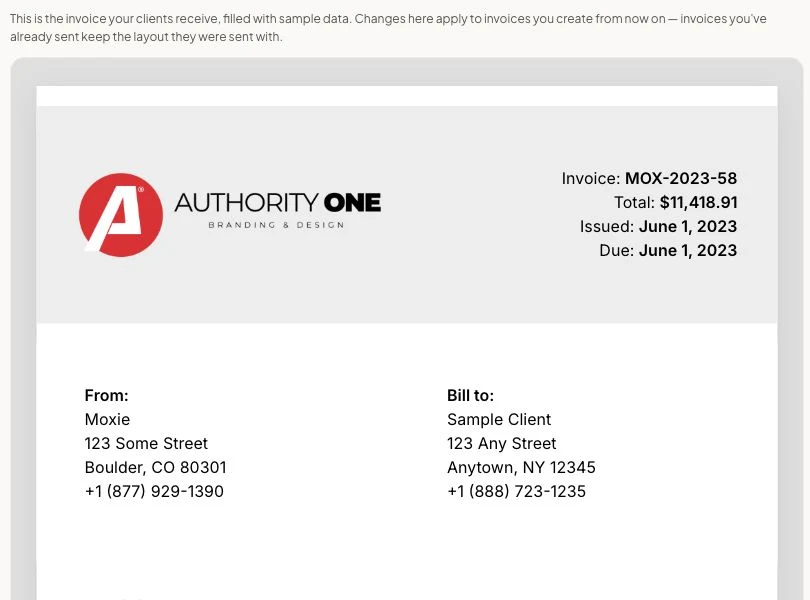
For a consultant, that might mean a regular monthly fee plus approved extra hours. For a website project, it might mean billing the agreed deposit and final balance. Having the invoice near the project makes more sense to me than recreating the same information in another app.
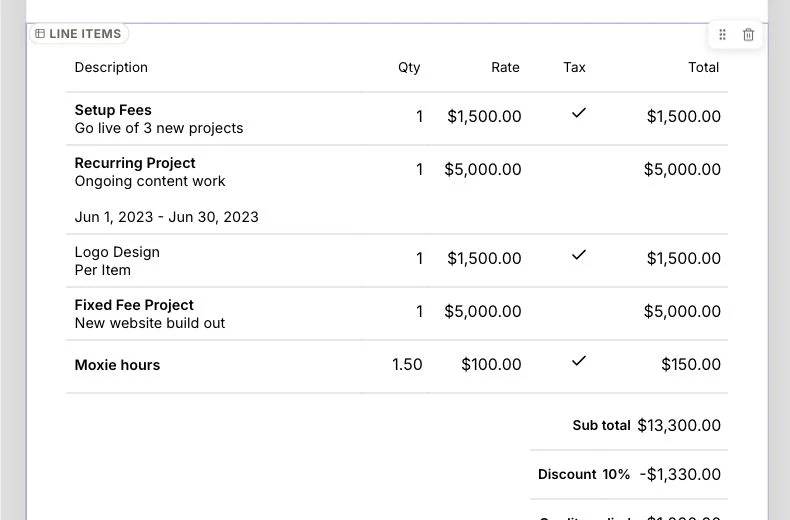
What to watch: Check payment terms, taxes, and reminder wording before sending. The subscription price doesn’t tell you the full cost of accepting payments; check your payment provider’s fees too. Moxie can organize billing, but it can’t decide what you should charge.
Agreements and contracts: protect the business before work begins
This is one of the strongest reasons to use a proper client system. “We discussed it on a call” is a poor place to leave the scope of a paid project.
Moxie lets you build reusable proposals and agreements, collect electronic signatures, and connect the agreed work to the project. Its proposal and contract tools help put the offer and acceptance in the same system.
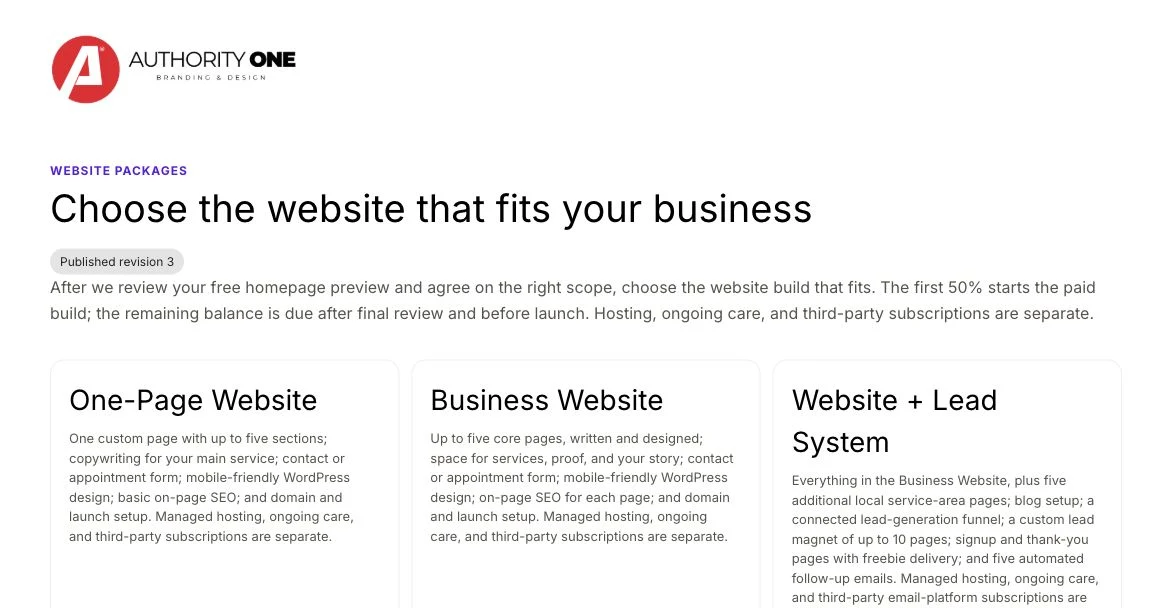
For my website work, the useful questions are concrete: What pages are included? How many revisions? What must the client provide? When is the balance due? What counts as additional work?
Clear answers help protect both sides from mismatched expectations. They also make an awkward “that wasn’t included” conversation easier because you can return to the agreed scope.
What to watch: A polished agreement screen doesn’t make vague terms good terms. Moxie handles the document and signing process; you still need wording appropriate to your work and business. Spend time on exclusions, payment milestones, and approval rules rather than just adding a logo.
Projects and tasks: repeat the good process
Moxie’s project tools include tasks, notes, files, time tracking, and different views of the work. Reusable templates are especially useful when you deliver the same kind of service repeatedly.
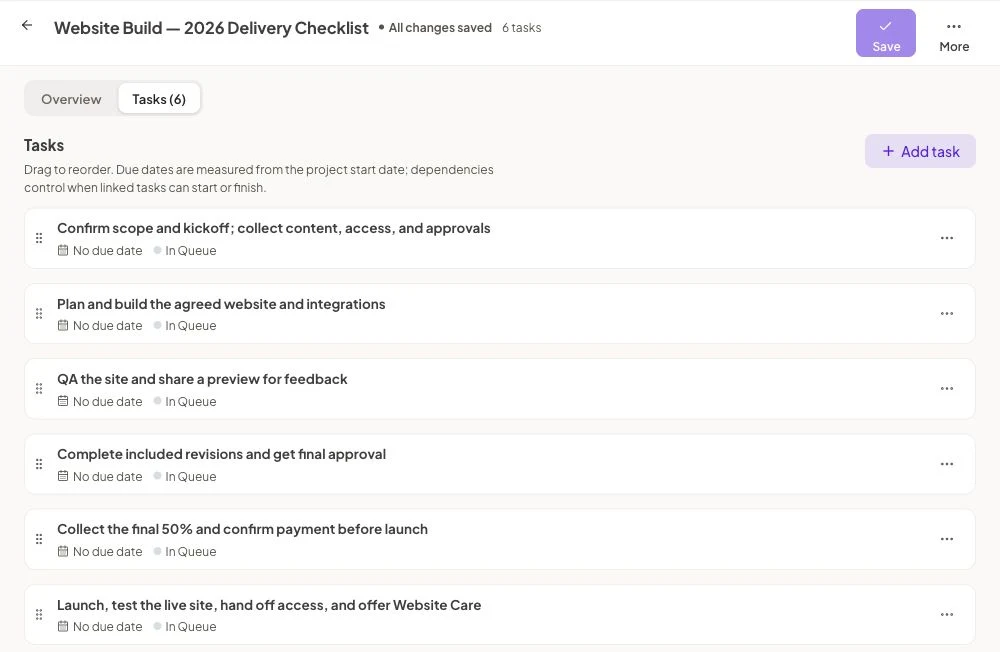
I like that a checklist can include the business steps as well as the production steps. “Build the website” matters. So do “get final approval” and “confirm payment before launch.” Those are easy to overlook when you’re busy making the thing.
What to watch: A template is a starting point. It won’t know that this client needs extra time for approvals or that you promised a different scope. Review the tasks and dates when you create the project. Copying an outdated checklist just repeats an outdated process.
The client portal: give clients one place to go
The client portal brings client-facing project information, documents, invoices, payments, files, and scheduling into a branded space. The branded portal is included in Pro and Teams.
The benefit is easy to explain: when a client needs their agreement or invoice, you can point them to one place. That can be a better experience than asking them to search an old email thread.
What to watch: Decide what the client should see. Your internal notes and every small production task may not help them. A portal also needs a simple introduction; don’t assume a client will start using it just because you enabled it.
Forms, leads, and scheduling: organize the first conversation
Moxie’s forms collect inquiries, while the sales pipeline helps you track opportunities. Its scheduling tools offer booking links and calendar connections.
We use a Moxie form for Authority One’s free homepage preview inquiry. That makes it part of the client process rather than just an email landing somewhere.
For another service business, useful stages might be “new inquiry,” “conversation booked,” “proposal sent,” and “waiting for a decision.” The point is being able to see who needs a next step.
What to watch: Keep the first form short enough that someone will actually fill it out. Test the form and the response they receive. A workflow that looks correct in the builder still needs a real test from the client’s side.
For geeks and techies: connect your favorite AI
This makes Moxie more interesting, especially if learning a new business system feels overwhelming. Alongside its built-in assistant, Moxie offers a connector called MCP. In plain English, it gives a compatible AI assistant a way to work with your Moxie account.
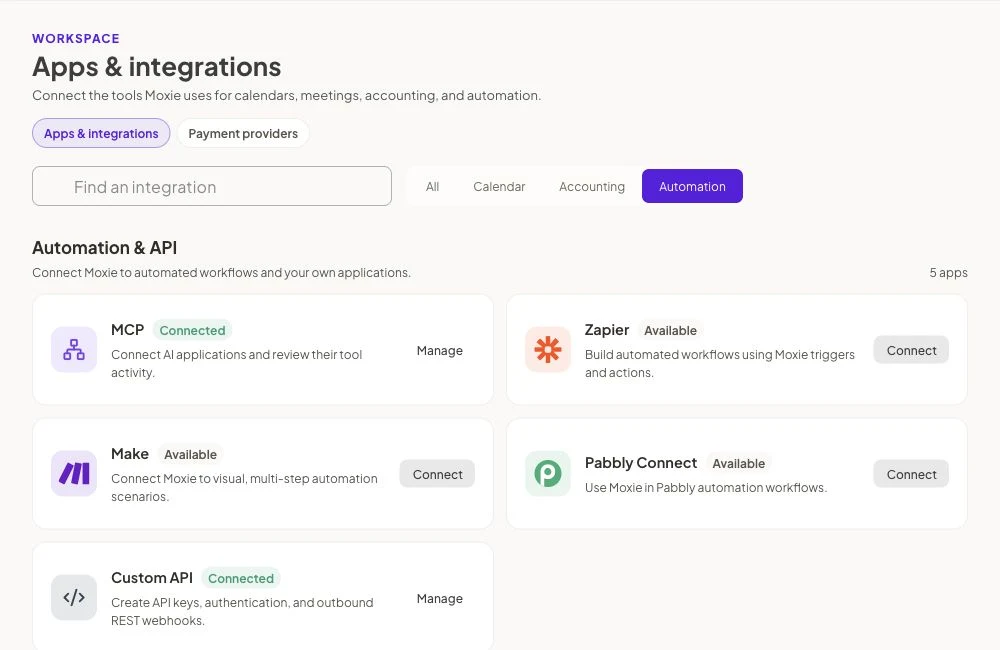
Moxie documents support for compatible clients such as Claude, ChatGPT, and Cursor. The external connection requires Pro or Teams, and the owner controls whether access is read-only or allows changes. Compatibility matters; every AI app won’t connect automatically. See the official AI connection guide and current limits.
Useful requests could sound like:
- “Show me projects with overdue tasks. Don’t change anything.”
- “Help me turn my website delivery process into a clear checklist.”
- “Draft an invoice from approved billable time, then let me check it before sending.”
That’s a helpful way to work: ask in ordinary language, inspect the result, and approve the next step. It can reduce the friction of finding information and preparing work.
What to watch: The connector has limits; workflow automation setup still happens in the app. AI also doesn’t replace your judgment about scope, billing, or what a client should receive. Start with read-only access if you mainly want help understanding the account.
The good, the bad, and the ugly
The good: useful tools at a price I love
Moxie puts the major parts of client work together without making a solo business buy a large team’s software package. Reusable agreements and project checklists are practical. Connected billing makes sense. The AI connection adds another way to work with the system.
For what I get, $25 a month for Pro feels like a steal. That’s my judgment after trying the alternatives—not a promise that every business will prefer the same app.
The bad: there is a learning curve
You need to learn where templates, project settings, forms, and workflow rules live. Then you need to make them match how your business runs. That takes thought, especially if your current process is mostly in your head.
AI can help explain and prepare parts of the work. It doesn’t remove the need to learn the basics. I’d build one straightforward client process first, then add automation once it works.
The ugly: automating a messy process makes a bigger mess
A reminder sent at the wrong time or an invoice with the wrong terms is still your client experience. This is the part I would take seriously with any of these systems.
Our own feedback request setup has needed testing and troubleshooting. That’s a useful reminder to test links, recipients, timing, and stop conditions before trusting a workflow. Don’t buy Moxie expecting every custom process to work without setup. The low subscription price is real; your setup time is real too.
What Moxie costs
At the time of this review, the published US-dollar monthly prices are Starter $12, Pro $25, and Teams $40. Pro is also $20 per month when billed annually, or $240 for the year.
Starter covers the core client-work tools. Pro adds features including the branded client portal, workflow automation, and API integrations. Teams is the option to examine when multiple team members need access. Compare the current plan details before subscribing.
For the business process I’m describing here, Pro is the plan I’d look at first. If you only need to send an occasional invoice, you may not need this much system.
Moxie versus HoneyBook, Dubsado, and Bonsai
I’ve tried all three. I prefer Moxie, especially for the price. That doesn’t mean the others are bad, or that Moxie is the only product with contracts, invoices, automation, or AI.
These products overlap, so a feature checklist alone won’t settle it. Try the same small sample project in the products you’re considering and compare how it feels to do your actual work.
- HoneyBook: compare its client-facing proposals, booking experience, and automation with the way you sell your service.
- Dubsado: compare the forms, branding, and workflow setup, including how much configuration you want to do.
- Bonsai: compare the project, time-tracking, and billing experience against your day-to-day needs.
My recommendation is Moxie because I like the combination of client-work tools and value.
Who I would recommend it to
Moxie belongs on your shortlist if you run a freelance or small service business, manage projects for clients, and want agreements, tasks, and billing to work together. It’s especially appealing when you’re juggling separate tools and repeatedly entering the same information.
I would look elsewhere first if your main need is inventory, complex field dispatch, or a large organization’s specialized operations. Those needs deserve a system built around them. And if all you want is basic invoicing, a simpler tool may be enough.
My recommendation: try one complete client journey
I recommend Moxie. Before moving your business into it, use sample data to walk through an inquiry, an agreement, a project, and an invoice. Look at the client-facing screens too.
Ask yourself: Can I explain the offer clearly? Can I see the next step? Does the invoice look right? Will the client understand what to do? Am I comfortable maintaining this setup?
If the answer is yes, Moxie offers a lot for a small monthly cost. For Authority One, it’s my pick.
