
 Good work.


I get why you’re thinking about it.
You need a website. You’re busy. And now there’s a tool that says it can build one while you finish your coffee.
Why pay someone when AI can do it for you?
It’s a fair question. Here’s the part I’d want you to think about before you put your business behind that finished-looking page:
When a customer lands on it, will they see a reason to choose you? Or will they see another business saying the same things as everyone else?
I’ve spent more than 25 years working with design and direct-response marketing. That means writing and designing to help someone take a useful next step. And I can tell you this: the hard part starts well before choosing a font.
You have to understand the customer. Find the right message. Decide what belongs on the page. Build trust. And make reaching out feel easy.
AI can give you something to look at. But if you don’t know how to judge what it gives you, you can launch a site that looks done while the important work is still missing.
We’ve had website templates for decades
Getting a ready-made design is nothing new. Website templates have been around for decades. WordPress, for example, introduced its theme system back in 2005.
Pick a layout. Add your logo. Change the colors. It sounds like most of the job is done.
Then you get to the harder questions. What should the headline say? Which service needs the most attention? What will make a stranger trust you? Why should they call you instead of the next business on Google?
A template gives you places to put things. It doesn’t decide what deserves to go there.
Design matters. The right layout helps people notice, understand, and feel comfortable. But the words, the offer, the proof, and the way the page leads someone toward contacting you all need thought, too.
AI can fill those spaces faster. You still need to know whether it filled them with something worth saying. That’s the part I wouldn’t leave to chance with your business.
AI website builders make the first part look easy
There are real benefits. AI can help sort out ideas, create a rough first draft, and explore different directions quickly. It can be useful when you’re stuck staring at a blank page.
I use AI to explore ideas, too. But I still have to decide what belongs on your website and what needs to go.
Fast progress can give you a false sense of being finished. You see a headline, pictures, service boxes, and a contact form. It looks like a website. So it feels ready.
A business owner who knows their trade inside out may still have little experience judging website copy, design, or the path from a visitor to a real inquiry. That gap matters.
You wouldn’t judge a roof repair by a shiny new truck. Your website deserves a closer look, too.
1. Generic copy gives customers no reason to pick you
“Quality service.” “Trusted experts.” “Solutions for your needs.”
Those words sound fine. They also tell a customer almost nothing.
Imagine five businesses on the same street using that same message. How would someone choose? The lowest price? The first listing? A coin toss?
Your best selling points often come from things a quick prompt leaves out: a small detail about your process, a concern you hear every week, or the way you make a customer feel looked after.
Let’s say you’re a family photographer
A broad introduction might read:
“Professional photography capturing your special moments. Book your session today.”
Now think about the parent who wants family photos but worries their kids won’t sit still. In this made-up example, the photographer runs relaxed outdoor sessions and gives families time to move, play, and warm up:
“Real moments. Even with restless kids.”
“Relaxed outdoor family photos with time to play, wander, and warm up. Tell me about your family, and we’ll plan a session that feels like you.”
Button: “Tell me about your family”
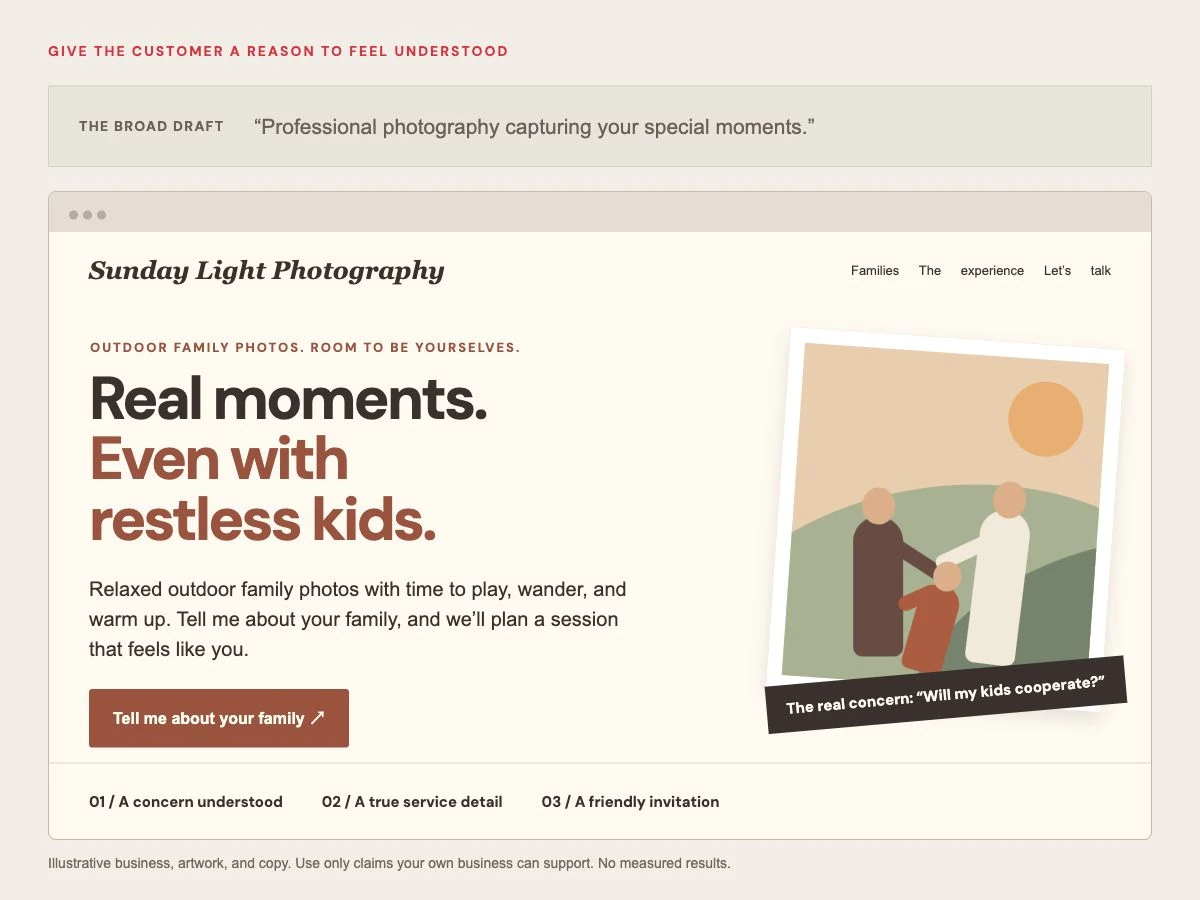
Now that parent can picture a session without spending the whole time saying, “Sit still!” The copy answers a real worry. And the first step is a conversation, rather than a booking they may not feel ready to make.
The better message came from a useful fact about the business. Only use details like these if they’re true for you. These are teaching examples, not actual AI outputs or tested sales results.
This is where experience helps: knowing which detail deserves the headline, which concern to answer next, and which words to leave out.
2. A beautiful page can still make it hard to become a customer
Good design does more than make things attractive. It helps people understand what matters, in the right order.
Think about someone looking for a plumber on their phone. They want to know:
- Do you handle my problem?
- Do you work in my area?
- Can I trust you in my home?
- What should I do next?
If the page starts with a giant animation, then a company history, then six equal-sized buttons, it may make simple answers harder to find.
I look at the flow of the page. Where does your eye go first? What question does the next section answer? Where do we need room to breathe? Where should the invitation to contact you appear?
Think of the page as a conversation. First, tell me you can help. Then show me why I should trust you. Once I feel comfortable, tell me what to do next.
That doesn’t mean every business gets the same formula. A house cleaner, a wedding photographer, and a roofer have different customers with different concerns.
Nielsen Norman Group’s research points to design quality, clear information, and easy-to-use menus as things that help people trust a website. So yes, looks matter. But people also need to find their way around.
Then we have to check the phone version. Can you read it? Is the important part of the photo still visible? Are the buttons easy to tap? Does the form feel manageable?
A desktop preview cannot answer those questions for you.
3. Confident words can hide facts that aren’t true
AI can produce a sentence that sounds certain even when the details are wrong. Google’s guidance on AI content calls for people to check its accuracy before publishing.
For a small business, that means checking every claim about:
- Your years in business, licenses, training, and insurance.
- The places you serve and the services you actually offer.
- Prices, hours, response times, and guarantees.
- Customer reviews, awards, and project results.
A line like “Our fully insured team is available 24/7” is a promise about your business. If it isn’t true, it shouldn’t be on your website.
The same care applies to pictures. A beautiful made-up kitchen doesn’t prove you remodeled one. A generated smiling crew isn’t your team. A made-up testimonial isn’t proof.
Use real work, real people, and real customer comments when you can, with permission where needed. Be clear when an image is an illustration.
You may already have the best material: photos of your work, kind words from customers, or details about how you do the job. We need to find those pieces and put them where someone is wondering, “Can I trust these people?”
4. A contact form on the page doesn’t mean the inquiry reaches you
Picture this: someone likes the site, fills in the form, and presses Send.
They see a success message. You receive nothing.
That’s why I’d never call a website ready just because a form appears on it. The whole path needs checking:
- The request. Is the form short enough? Does it ask what you need to start a useful conversation?
- The delivery. Does a real test reach the right inbox or customer system?
- The confirmation. Does the visitor know the request went through and what happens next?
- The follow-up. Who replies, and how do you keep requests from getting lost?
A form also needs clear labels and helpful messages when someone misses a field. W3C’s forms guidance explains how clear success and error messages help people complete a request.
Then comes a question many owners forget: can you tell whether the site is bringing useful inquiries?
Start small. Keep a record of how people found you, what they asked for, and whether they hired you. A button click is useful to know about. It still isn’t a paid job.
When you only judge the finished screen, all of this can stay out of sight.
5. “SEO-ready” doesn’t mean customers will find you
SEO means helping search engines understand your site and helping people find useful answers there.
A tool may create a page title and a short search description. That’s a start. It doesn’t give you a plan for attracting the right customers.
Suppose you clean homes around Scranton. Your customers may want to know what a first cleaning includes, whether they need to be home, and how to get a price for their house.
A page full of “exceptional cleaning solutions” misses those questions. A helpful page answers them in plain language, with accurate details about your service and area.
There are technical checks, too: pages must be available for search engines to read, links should work, and important content shouldn’t disappear on a phone.
Google warns against using tools to churn out lots of pages that don’t help anyone. Its AI content guidance asks for accurate, useful information that fits what the reader needs.
So I wouldn’t worry about winning a race to publish the most words. I’d focus on giving a future customer a better answer.
Nobody can promise you a certain spot on Google. But a site that answers your customers’ questions gives your search work a much better starting point.
6. The low starting price may leave out the expensive parts
A low monthly price can look like a great deal. Before you sign up, ask what it will cost to get everything you need working—and keep it working.
Before choosing any setup, get clear answers to these questions:
- What will I pay later? Check renewal prices and costs for the domain, email, forms, booking tools, and other things you need.
- Whose account is it? Know who controls your domain and site access. Keep a record you can find.
- Can I move the site? Ask what can be exported and whether moving means rebuilding the design or features.
- Who handles problems? Find out what support covers and what you’ll need to handle yourself.
- Who keeps it working? Be clear about backups, updates, security, and checks after changes.
Ask who is responsible for hosting, backups, and support. Find out what happens when the site goes down or something stops working. Those answers matter more than a reassuring sales line.
These questions matter whether you hire a designer or use a builder. Get the answers before you settle into a setup that may be hard to change.
I custom build on WordPress. We can talk through what fits your business and who will handle its ongoing care. Here’s how I approach website care and growth.
Your own time belongs in the cost, too. Hours spent fixing layouts and chasing lost messages are hours you can’t spend serving customers.
A second example: answer the worry behind the service
Let’s take a home cleaning business. “Enjoy a sparkling clean home” is a pleasant promise. It may also leave the customer’s biggest worry untouched:
“I’m letting someone into my house. What will this be like?”
In this illustrative example, the owner explains what the first visit includes before the customer books. That gives us a more useful opening:
“Come home to clean. Know what to expect before we arrive.”
“Tell us about your home and the help you need. We’ll explain what’s included in your first cleaning and send a quote before you book.”
Button: “Get a quote for my home”
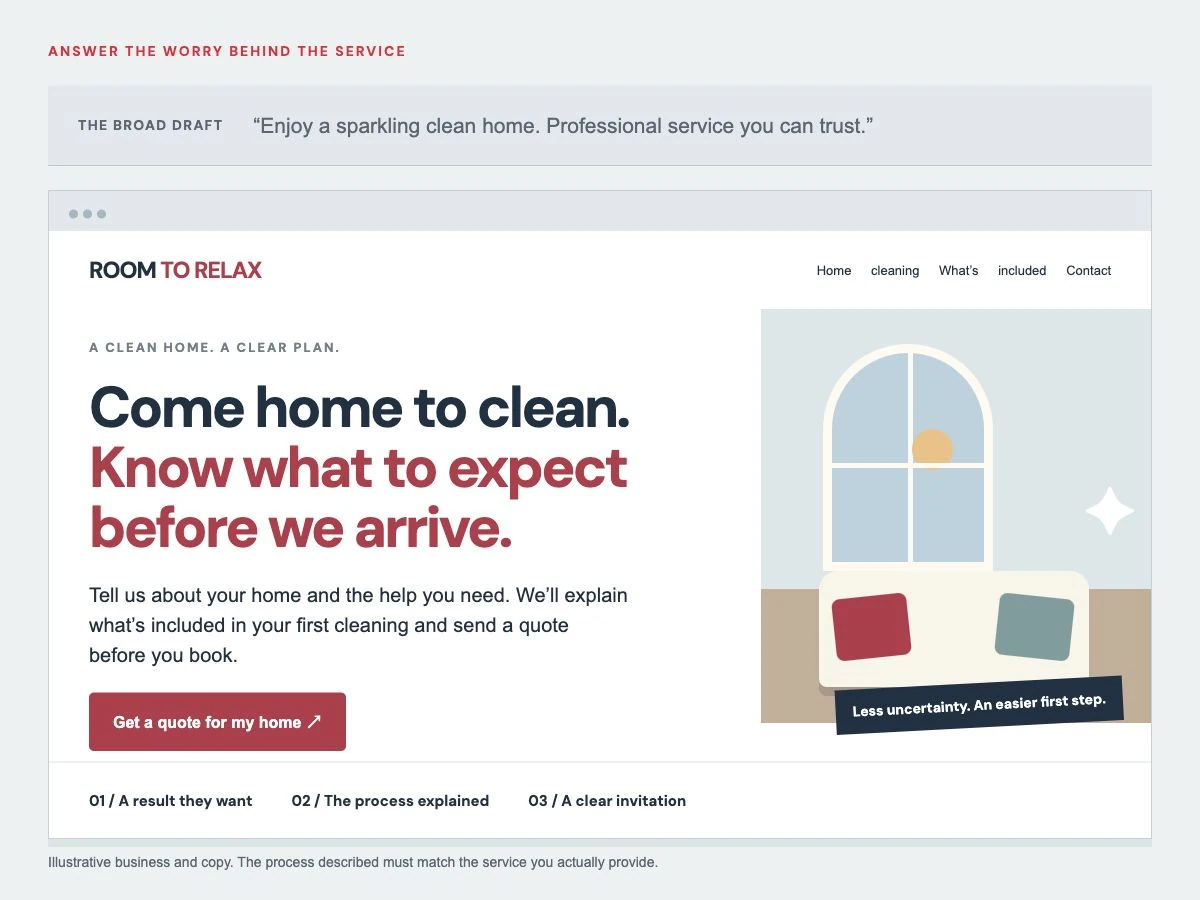
That tells me two things: I can get help with the cleaning, and I’ll know what I’m agreeing to before I book. Below it, I’d show real team photos, a clear list of what’s included, and a real customer’s words about the visit.
If the business has a verified screening process or insurance, explain it accurately. If not, don’t invent it to make the page sound stronger.
A good page earns trust with things the business can stand behind.
For a fuller example, see my before-and-after design study of a real local cleaning website. I explain the thinking behind the proposed changes.
AI website builder vs web designer: what are you really comparing?
The question is: who is doing the thinking and checking? If you use a builder yourself, that person is you. A good designer should help you work out what the page needs, explain the choices, and check the agreed details before launch.
| The job | Using a builder yourself | What to expect from a good designer |
|---|---|---|
| Finding your message | You supply the right facts and judge the draft. | Questions that uncover why a customer should choose you. |
| Shaping the design | You judge the layout, page flow, and phone version. | A clear visual plan built around your customer and next step. |
| Getting it ready | You check facts, links, forms, search basics, and delivery. | Clear responsibility for agreed launch checks. |
| Getting help later | You learn the tools or find help when needed. | A named person and a clear support or care agreement. |
A designer has to earn that difference. Hiring someone doesn’t automatically get you strong copy, thoughtful design, or careful testing. Ask how they work and look at the work they’ve done.
What my 25 years bring to your website
I’ve worked with internet marketers for two decades. Direct response taught me to look beyond “Does this look nice?” and ask “Why would someone take the next step?”
That’s the thinking I bring to your small business. You need people to understand what you offer, believe you can help, and feel comfortable getting in touch.
When you work with me, we work one on one. You can explain your business in normal words. You don’t need to arrive with polished copy or a technical plan.
We talk about who you help, what customers worry about, and what makes your service worth choosing. Then I use that to guide the message, design, and page flow.
You have someone to ask, “Does this make sense?” Someone who knows the project and can explain the choices. That personal attention matters when a website feels like a big thing to take on.
I want the process to feel friendly and manageable. And I want you to feel proud when you send someone to your site.
You can see the work and hear from my clients, or meet the person you’ll be working with.
Before you launch, check the things customers will notice
If you already have an AI-built site, you don’t need to panic. You do need to look past how finished it appears.
Use this checklist on any website, however it was built:
- The opening: Can a stranger tell what you do, who you help, where you work, and why they should care?
- The message: Is there a real reason to choose you beyond “great service”?
- The proof: Are photos, reviews, credentials, and claims genuine and accurate?
- The next step: Is there one clear main action? Does the button explain it?
- The phone version: Read the page and try the buttons on an actual phone.
- The form: Submit a test. Confirm it arrives and that the visitor gets a useful response.
- The details: Check phone numbers, email addresses, service areas, prices, and links.
- The speed: Run a check with Google PageSpeed Insights. Also try the page yourself on a phone connection.
- The search basics: Give each important page a clear topic and title. Check that search engines can read it.
- The care plan: Know who controls the accounts and who handles backups, problems, and updates.
For WordPress, its own update guidance recommends taking a backup first. That’s one example of the work that continues after a site is built.
Try this simple customer test
Show the homepage to someone who doesn’t know your business well. Don’t explain it first.
Ask: “What do we do? Who is it for? What makes you trust us? What would you click next? Is anything making you hesitate?”
If they need your help to answer, that gives you a place to improve. Your future customers won’t have you beside them to explain the page.
Questions small business owners ask about AI websites
Why shouldn’t I just use AI to build my own website?
Because someone still has to check the words, layout, forms, and all the details behind the page. AI can give you a draft quickly. It’s much harder to spot what that draft is missing. If your business depends on the site, I’d want someone experienced checking the work.
Can an AI-built website look professional?
Yes. That’s why judging only its appearance is risky. Look at whether it explains your service, earns trust, works well on a phone, and helps someone contact you. An attractive page can still miss those things.
Will Google penalize my site just because I used AI?
Using AI is not, by itself, the issue. Google’s guidance focuses on useful, accurate content and warns against mass-produced pages that add no value. Copy that says little—or gets your facts wrong—won’t give a customer much reason to stay, however it was written.
Can AI write the sales copy for my website?
It can produce a draft. You still need someone to decide whether it says the right thing to the right customer. Start with real customer concerns, truthful business details, and a clear next step. Check every claim before it goes live.
Is building it myself always cheaper?
It may cost less to start. But count the extra features, renewal fees, your time, and any help you need to fix things. Compare the whole job, rather than the first price you see.
Is AI useful anywhere in the process?
Yes, especially for exploring ideas and rough drafts under human direction. My concern is letting an unchecked result become the public face of your business. Getting a draft faster helps. Knowing whether it’s ready to represent your business is a different job.
When might doing it myself be enough?
A temporary page for testing a simple idea may have a smaller job to do. You still need accurate information and working contact details. When you rely on the site for customer inquiries or send paid traffic to it, the cost of missing important details rises.
I already used AI. Do I have to start over?
Not necessarily. Check the message, proof, phone layout, forms, and ongoing setup first. Some sites need focused improvements. Others need a bigger rethink. The useful starting point is understanding what’s working and what’s getting in the way.
Does hiring a designer guarantee more customers?
No. Demand, traffic, pricing, reputation, and follow-up all affect what happens. Good design and copy aim to help the right people understand and contact you. Look for clear thinking and real work, then measure the results.
How can I see whether working with you is right for me?
Start with a free homepage design preview. We can explore a direction for your business before you decide to have it built. The preview is a design concept, not a complete working website.
Your business deserves more than a page that looks finished
You’ve put real work into what you do. Your website should help a stranger see that.
The details that make people choose you deserve more thought than a quick prompt and a Publish button. A clear message. Real proof. A design that feels like your business. An easy next step.
If you’d like to see what that could look like for you, let’s start with your free homepage preview.
Research checked October 5, 2026. This is a practical guide to judging a business website, not a benchmark of individual AI builders. The copy examples are original teaching examples; they are not client projects or measured results.
